Skip to content
SmartFactoryTools
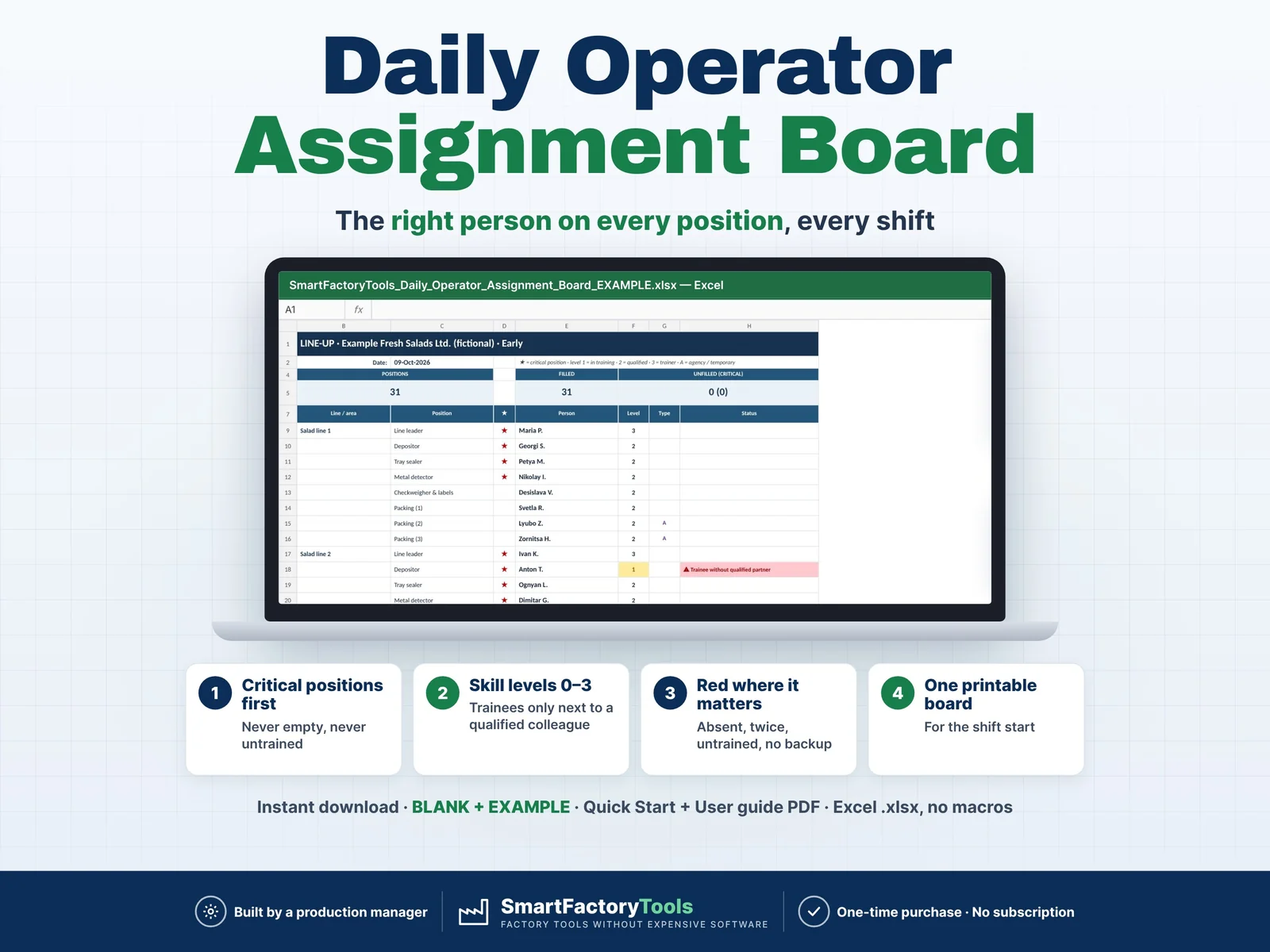
Daily Operator Assignment Board – main listing image

Workforce & Shifts

Daily Operator Assignment Board

The right person on every position, every shift – an Excel operator assignment board that proposes the line-up from who is present and what they are qualified to do.

€17.99

SKU: SFT-ASSIGN-01 · Digital download (Microsoft Excel)

View on Etsy

Purchase and download through Etsy. Opens in a new tab.

Key features

  • Proposes a complete line-up in seconds: critical positions first, only present and qualified people (level ≥ the position's minimum)
  • Smart rules: skills with the fewest qualified people are filled first; people whose other skills are scarce today are kept free; home line preferred
  • You decide: put your own names on any position (CHOICES) – your choices belong to the position and shift and never move to another row
  • Safety net: if the date or shift changes, your old choices turn red until you confirm them for today
  • Clear status per place: OK · trainee with qualified partner · UNFILLED · ⚠ not present · assigned twice · not trained · level too low · trainee alone · blocked skill
  • Hint for every empty place: nobody qualified present, not enough qualified people, or "swap" – a qualified person works elsewhere
  • Skill cover today: SHORT / NO BACKUP / +n for every skill needed on the shift
  • Spare people and absent people (with reason) on the board
  • Printable BOARD per shift, grouped by line, with critical ★, levels and agency staff
  • Block a skill for one person today (e.g. no forklift after an injury)
  • HISTORY archive: paste each shift's line-up and filter who worked where
  • Import skill levels from the SmartFactoryTools Skills Matrix (copy & paste, level scale translated automatically) – no double entry. Also works with any skills list in the same layout, or type the levels directly.

Main benefits

  • Critical positions filled first – never empty, never untrained
  • Skill levels 0–3, trainees only next to a qualified colleague
  • Red where it matters: absent, double-booked, untrained, no backup
  • Instant download: BLANK + EXAMPLE · Quick Start + User guide PDF
  • Built by a production manager · one-time purchase, no subscription, no macros

Who this tool is for

  • Shift leaders, supervisors and line leaders
  • Production and operations managers
  • Food, packaging, assembly, warehouse and contract-packing plants with 15–80 people per shift

How it works

  • 1. Once: skills (up to 100), positions per line with required skill, minimum level, critical yes/no and people per shift, and your people with a level 0–3 per skill.
  • 2. Every shift: mark who is present (P) or absent, sick, on holiday or training.
  • 3. Check the proposal, put your own names where you want, fix anything red.
  • 4. Print the BOARD and paste the day into HISTORY.

What's included

  • SmartFactoryTools_Daily_Operator_Assignment_Board_v1.0_BLANK.xlsx – ready for your plant
  • SmartFactoryTools_Daily_Operator_Assignment_Board_v1.0_EXAMPLE.xlsx – fictional fresh-salad & ready-meal plant: 46 people, 14 skills, 21 positions, Early shift with sick, holiday and training absences
  • Quick_Start_Guide.pdf – 2 pages
  • User_Guide.pdf – 6 pages: every sheet, rule, status and check explained, incl. the Skills Matrix import
  • Sheets: START_HERE, SETUP, POSITIONS, EMPLOYEES, IMPORT_SKILLS, IMPORT_DATA, TODAY, CHOICES, ASSIGN, BOARD, HISTORY, FAQ, LICENSE

Software requirements

  • Requires Microsoft Excel 2016 or newer on a computer (Windows or Mac). Not for Google Sheets, Apple Numbers or mobile apps. No macros.

Important limitations

  • One shift on one day per board (archive in HISTORY, a dated copy or a PDF). The rota over weeks is in our Shift Rota & Crew Rotation Planner.
  • One person = one position per shift; rotation within the shift is not planned (split a position into "1st half / 2nd half" if needed)
  • The proposal is rule-based with Excel formulas, not a full mathematical optimisation – the supervisor always decides
  • 80 people · 100 skills · 40 positions · up to 4 people per position · 100 places per shift · 3 shift names
  • No time & attendance, hours or pay
Full product description

The right person on every position, every shift – an Excel operator assignment board that proposes the line-up from who is present and what they are qualified to do.

  • Critical positions filled first – never empty, never untrained
  • Skill levels 0–3, trainees only next to a qualified colleague
  • Red where it matters: absent, double-booked, untrained, no backup
  • Instant download: BLANK + EXAMPLE · Quick Start + User guide PDF
  • Built by a production manager · one-time purchase, no subscription, no macros

▶ Requires Microsoft Excel 2016 or newer on a computer (Windows or Mac). Not for Google Sheets, Apple Numbers or mobile apps. No macros.

Every shift start the same job: who is sick, who goes to which line and machine, is the person trained for it, is the trainee alone on a critical position, who is left over – usually on a whiteboard. Mistakes are expensive: an untrained person on the metal detector, one name written twice, a critical position left empty, only one qualified operator in today and nobody notices. This board does the checking for you.

WHAT IT DOES

  • Proposes a complete line-up in seconds: critical positions first, only present and qualified people (level ≥ the position's minimum)
  • Smart rules: skills with the fewest qualified people are filled first; people whose other skills are scarce today are kept free; home line preferred
  • You decide: put your own names on any position (CHOICES) – your choices belong to the position and shift and never move to another row
  • Safety net: if the date or shift changes, your old choices turn red until you confirm them for today
  • Clear status per place: OK · trainee with qualified partner · UNFILLED · ⚠ not present · assigned twice · not trained · level too low · trainee alone · blocked skill
  • Hint for every empty place: nobody qualified present, not enough qualified people, or "swap" – a qualified person works elsewhere
  • Skill cover today: SHORT / NO BACKUP / +n for every skill needed on the shift
  • Spare people and absent people (with reason) on the board
  • Printable BOARD per shift, grouped by line, with critical ★, levels and agency staff
  • Block a skill for one person today (e.g. no forklift after an injury)
  • HISTORY archive: paste each shift's line-up and filter who worked where
  • Import skill levels from the SmartFactoryTools Skills Matrix (copy & paste, level scale translated automatically) – no double entry. Also works with any skills list in the same layout, or type the levels directly.

WHAT'S INCLUDED (ZIP)

  • SmartFactoryTools_Daily_Operator_Assignment_Board_v1.0_BLANK.xlsx – ready for your plant
  • SmartFactoryTools_Daily_Operator_Assignment_Board_v1.0_EXAMPLE.xlsx – fictional fresh-salad & ready-meal plant: 46 people, 14 skills, 21 positions, Early shift with sick, holiday and training absences
  • Quick_Start_Guide.pdf – 2 pages
  • User_Guide.pdf – 6 pages: every sheet, rule, status and check explained, incl. the Skills Matrix import

Sheets: START_HERE, SETUP, POSITIONS, EMPLOYEES, IMPORT_SKILLS, IMPORT_DATA, TODAY, CHOICES, ASSIGN, BOARD, HISTORY, FAQ, LICENSE

HOW IT WORKS

  1. Once: skills (up to 100), positions per line with required skill, minimum level, critical yes/no and people per shift, and your people with a level 0–3 per skill.
  2. Every shift: mark who is present (P) or absent, sick, on holiday or training.
  3. Check the proposal, put your own names where you want, fix anything red.
  4. Print the BOARD and paste the day into HISTORY.

WHO IT'S FOR

  • Shift leaders, supervisors and line leaders
  • Production and operations managers
  • Food, packaging, assembly, warehouse and contract-packing plants with 15–80 people per shift

LIMITS

  • One shift on one day per board (archive in HISTORY, a dated copy or a PDF). The rota over weeks is in our Shift Rota & Crew Rotation Planner.
  • One person = one position per shift; rotation within the shift is not planned (split a position into "1st half / 2nd half" if needed)
  • The proposal is rule-based with Excel formulas, not a full mathematical optimisation – the supervisor always decides
  • 80 people · 100 skills · 40 positions · up to 4 people per position · 100 places per shift · 3 shift names
  • No time & attendance, hours or pay

FAQ

Q: Does it work in Google Sheets or on an iPad?

A: No. It is built and tested for Microsoft Excel 2016 or newer on Windows or Mac desktop.

Q: Do I need the Skills Matrix?

A: No. You can type the levels on EMPLOYEES. If you already use the SmartFactoryTools Skills Matrix, paste its levels instead of retyping them.

Q: Why does it not suggest my trainees?

A: Level 1 people are suggested only where the minimum level is 1 (e.g. packing). Elsewhere place them next to a qualified colleague yourself.

Q: What if a position stays empty although people are present?

A: The Hint tells you why. "Swap" means a qualified person works on another position – move one and the file refills his place.

Q: Can I change the formulas?

A: Sheets are protected without a password to prevent accidental damage. Review › Unprotect Sheet unlocks them.

Related SmartFactoryTools templates: Skills Matrix & Coverage Risk Planner, Shift Rota & Crew Rotation Planner, Training Matrix, Manpower Requirement Calculator.

DIGITAL DOWNLOAD

This is a digital product – nothing is shipped. After purchase, download the ZIP on a computer, unzip it and open the files in Excel. Because of the digital nature of the product, returns are not accepted; if anything is unclear, message us and we will help.

LICENSE

For use within the buyer's own company or organisation. Resale, sharing, redistribution or uploading to other websites is not permitted. © SmartFactoryTools

Related tools

Skills Matrix & Coverage Risk Planner – main listing imageWorkforce & Shifts

Skills Matrix & Coverage Risk Planner

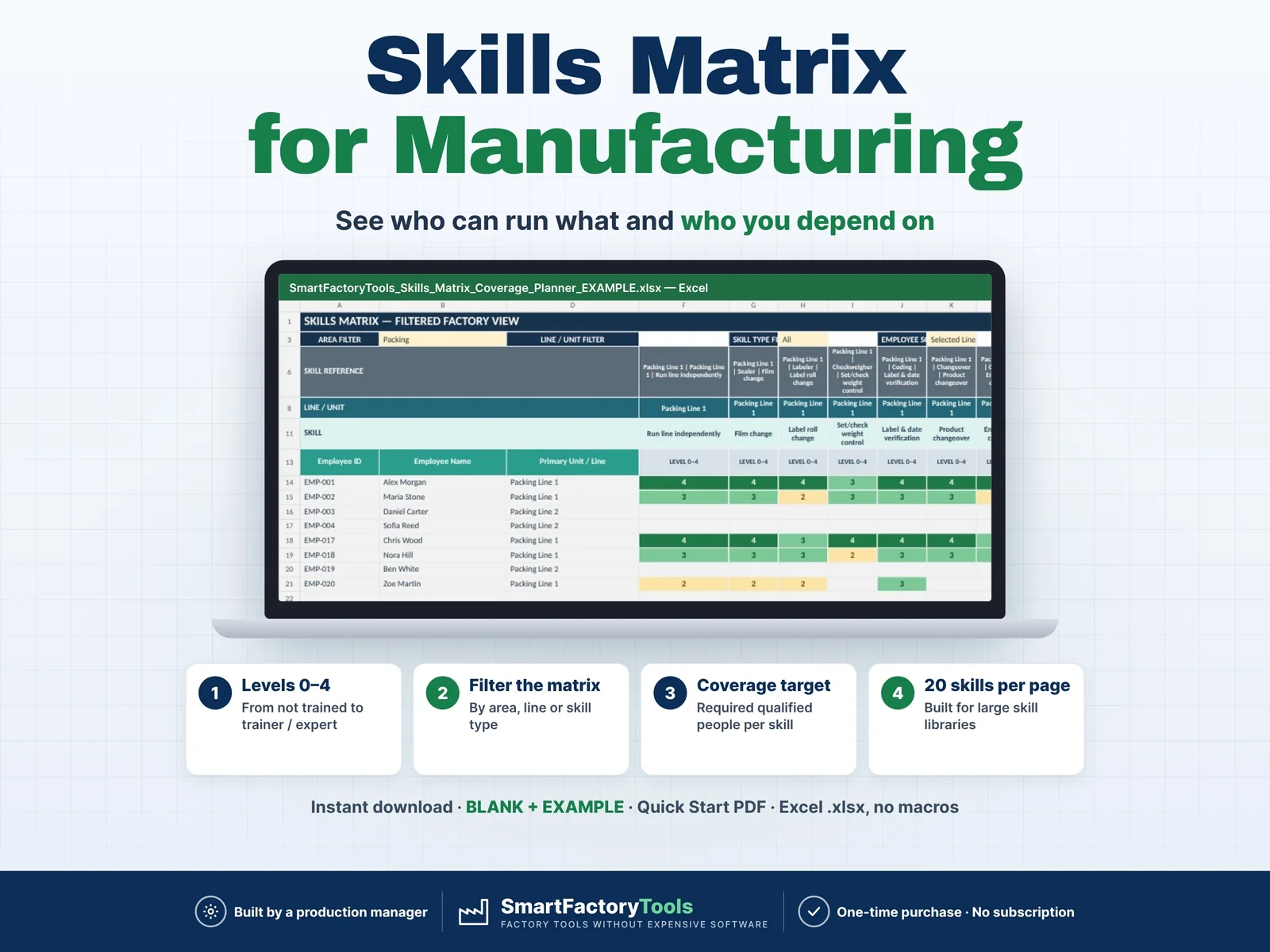
Build a clear employee skills matrix, identify single-person dependencies, and see exactly where cross-training is needed before qualification gaps become production risks.

€19.99

View details
Manpower Requirement Calculator – main listing imageWorkforce & Shifts

Manpower Requirement Calculator

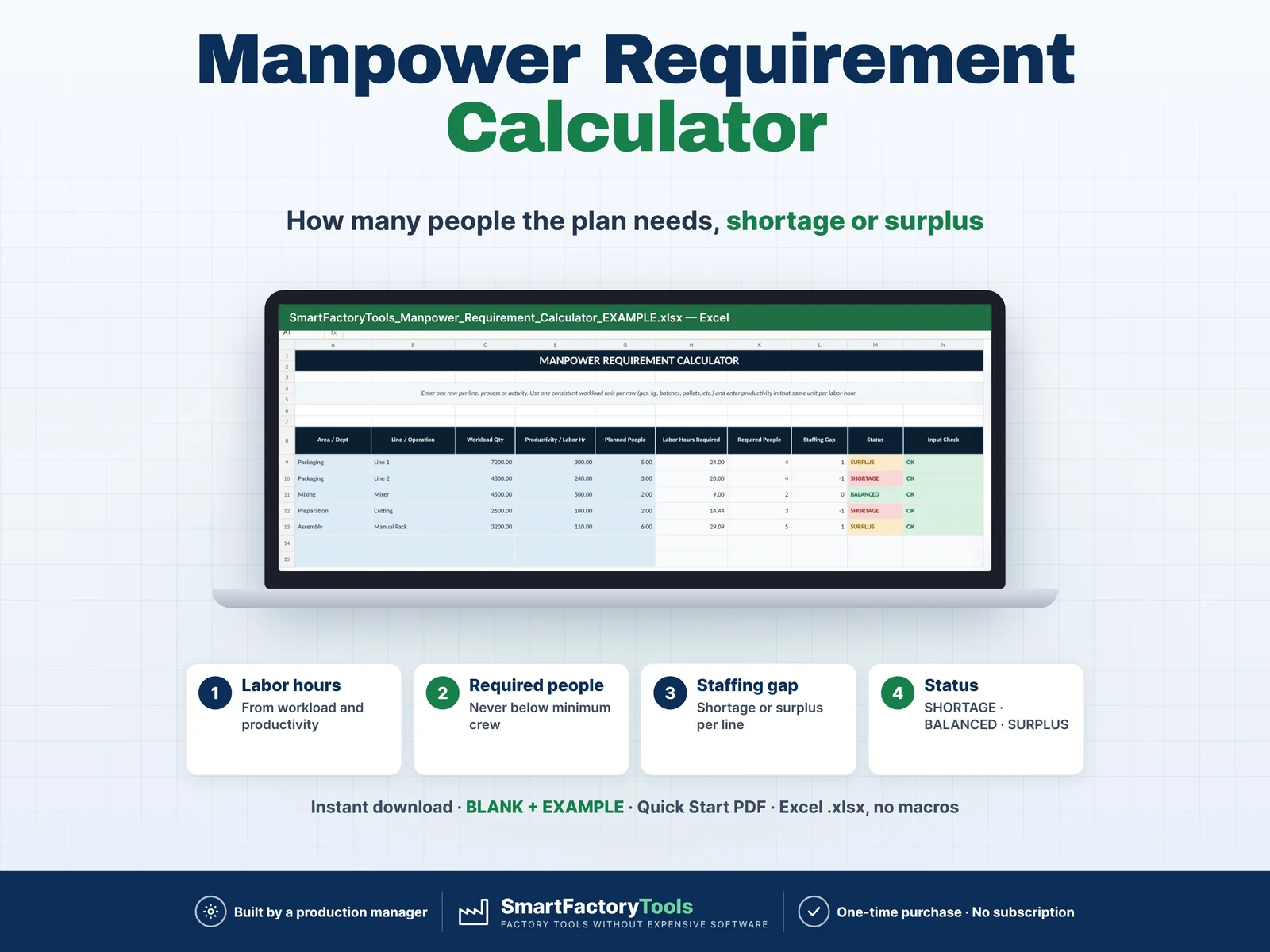
Calculate how many people your production plan actually requires and quickly identify staffing shortages, balanced areas and surplus manpower. Enter your workload, labor productivity, minimum crew requirements and currently planned people. The workbook automatically calculates required labor hours, required headcount and staffing gaps for each production line, department or operation. Designed for production planners, supervisors, manufacturing managers and operations teams that need a fast and practical workforce planning tool.

€7.99

View details
Training Matrix & Certification Expiry Tracker – main listing imageWorkforce & Shifts

Training Matrix & Certification Expiry Tracker

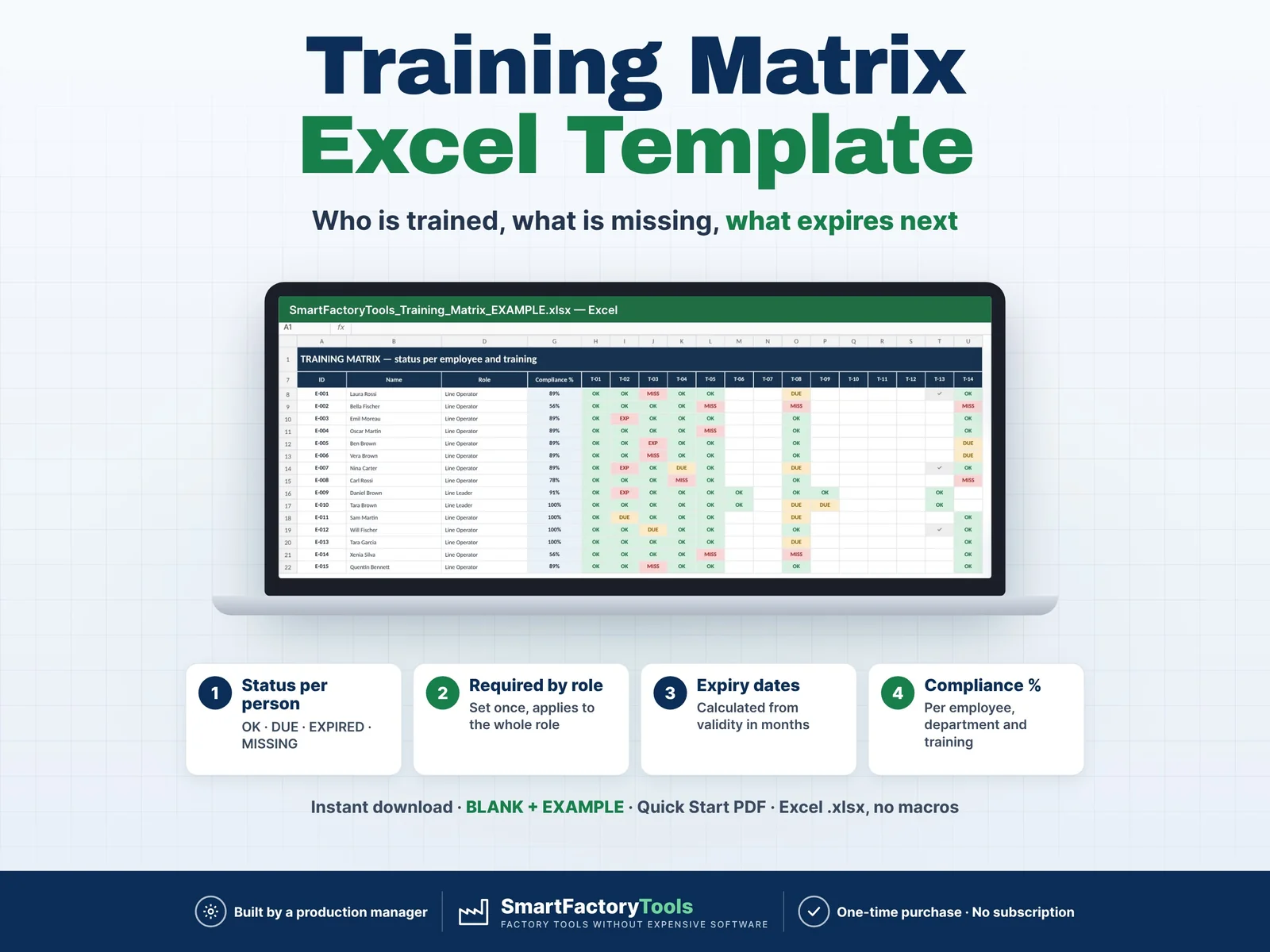
Know who is trained, what is missing and what expires next — for every employee, by role.

€19.99

View details