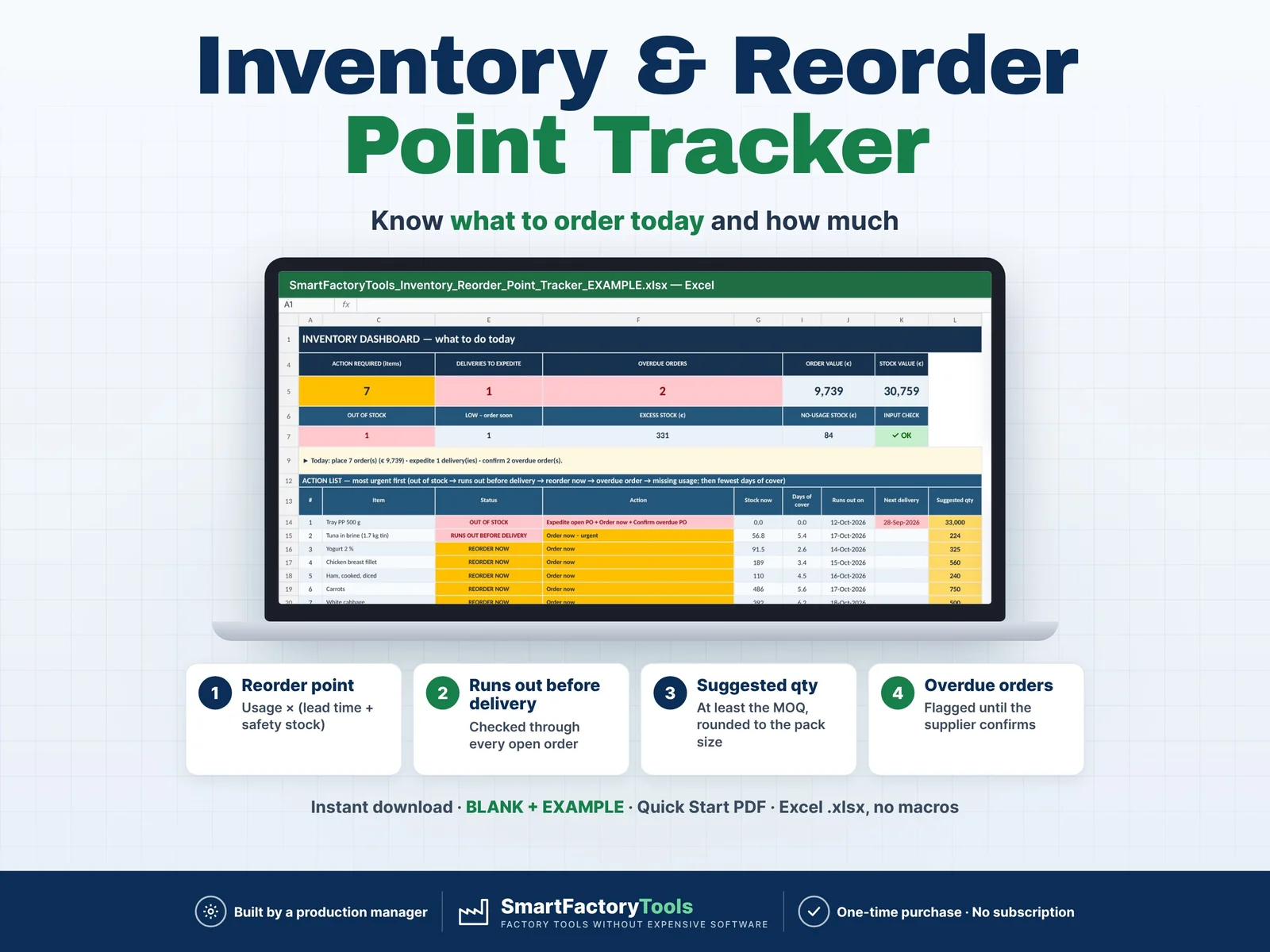
Know what to order today, how much, and which deliveries to chase – an Excel inventory and reorder point tracker built by a production manager.
- Reorder point = usage × (lead time + safety stock)
- Run-out before delivery checked through every open order
- Suggested quantity: at least the MOQ, rounded to the pack size
- Instant download: BLANK + EXAMPLE · Quick Start PDF
- Built by a production manager · one-time purchase, no subscription, no macros
▶ Requires Microsoft Excel 2016 or newer on a computer (Windows or Mac). Not for Google Sheets, Apple Numbers or mobile apps.
Most small plants keep stock in a simple list: what came in, what went out, maybe a fixed minimum. It does not tell you that the yogurt runs out on Wednesday, that the next tray delivery arrives a week too late, or that a supplier order is 14 days overdue. This tracker turns your receipts and issues into a daily action list – to reduce stock-out risk without tying up unnecessary cash in inventory.
WHAT IT DOES
- Current stock per item from opening stock + receipts − issues ± adjustments
- Average daily usage from your own issues (last 30 days, adjustable) – or a manual value for new items
- Reorder point = usage × (lead time + safety days), days of cover and "runs out on" date
- Counts every open purchase order in the inventory position
- Delivery check: stock is projected through EVERY open order in date order – a small early delivery cannot hide a stock-out before a big late one
- Status per item: OUT OF STOCK · RUNS OUT BEFORE DELIVERY · REORDER NOW · ORDERED · LOW · OK · OVERSTOCK · NO USAGE DATA
- Action per item: Order now · Expedite open PO · Confirm overdue PO · Enter manual usage
- Suggested order quantity: covers lead time + safety + your review period, at least the minimum order quantity, rounded up to the pack size (MOQ 10,000 + pack 1,500 → 10,500)
- No demand signal = no purchase suggestion (a minimum order quantity alone never triggers an order)
- Dashboard: action required, orders to place, deliveries to expedite, overdue orders, order value, stock value, excess stock, no-usage stock, stock value by category, monthly issues vs receipts
- Physical count helper: enter the counted quantity, see the adjustment to book
- Input checks: duplicate codes, unknown items, missing dates, wrong types, text in number fields
WHAT'S INCLUDED (ZIP)
- SmartFactoryTools_Inventory_Reorder_Point_Tracker_v1.0_BLANK.xlsx – ready for your own stock
- SmartFactoryTools_Inventory_Reorder_Point_Tracker_v1.0_EXAMPLE.xlsx – fictional deli-food plant: 40 items, about 2,900 movements, 21 open orders
- Quick_Start_Guide.pdf – 2 pages
Sheets: START_HERE, SETUP, ITEMS, MOVEMENTS, OPEN_ORDERS, STOCK, DASHBOARD, FAQ, LICENSE
HOW IT WORKS
- ITEMS – code, name, unit, opening stock from a stock count, lead time in days. Optional: unit cost, safety days, MOQ, pack size, supplier, category.
- MOVEMENTS – log receipts, issues and adjustments (pick the item from a drop-down list).
- OPEN_ORDERS – purchase orders placed and their expected arrival dates.
- DASHBOARD – place the suggested orders, expedite late deliveries, confirm overdue orders.
WHO IT'S FOR
- Storekeepers and warehouse leads in small plants
- Purchasing coordinators and buyers
- Production and operations managers without an ERP / MRP system
- Food, packaging, cosmetics and assembly plants – raw materials, ingredients, packaging, labels, consumables
LIMITS
- Consumption-based reordering from past usage. It does not use a production plan or bill of materials – for plan-driven material planning see our Material Requirements Planner (MRP).
- 300 items · 5,000 movement lines · 200 purchase order lines · 12 categories
- One stock per item (location is information only) · one unit cost per item
- No lot / expiry / FIFO tracking, no barcodes, no unit conversion
- Usage, lead time and safety stock are in calendar days
- A decision aid – check stock and supplier confirmations before ordering
FAQ
Q: Does it work in Google Sheets or on an iPad?
A: No. It is built and tested for Microsoft Excel 2016 or newer on Windows or Mac desktop.
Q: How do I start with my real stock?
A: Count the stock, enter the counted quantities and the count date on ITEMS, then log every receipt and issue from that day.
Q: What if a new item has no usage history yet?
A: Enter a manual daily usage on ITEMS. Without usage the file shows NO USAGE DATA and does not suggest an order.
Q: What is the difference between "Order now" and "Expedite open PO"?
A: If a new order can still arrive before the stock runs out, the file suggests a quantity to order. If not, only a faster delivery of an open order (or an alternative) helps – it tells you to expedite.
Q: Can I change the formulas?
A: Sheets are protected without a password to prevent accidental damage. Review › Unprotect Sheet unlocks them.
Related SmartFactoryTools templates: Material Requirements Planner (MRP), Manufacturing Cost per Unit Calculator, Preventive Maintenance Planner.
DIGITAL DOWNLOAD
This is a digital product – nothing is shipped. After purchase, download the ZIP on a computer, unzip it and open the files in Excel. Because of the digital nature of the product, returns are not accepted; if anything is unclear, message us and we will help.
LICENSE
For use within the buyer's own company or organisation. Resale, sharing, redistribution or uploading to other websites is not permitted. © SmartFactoryTools
 Production Planning