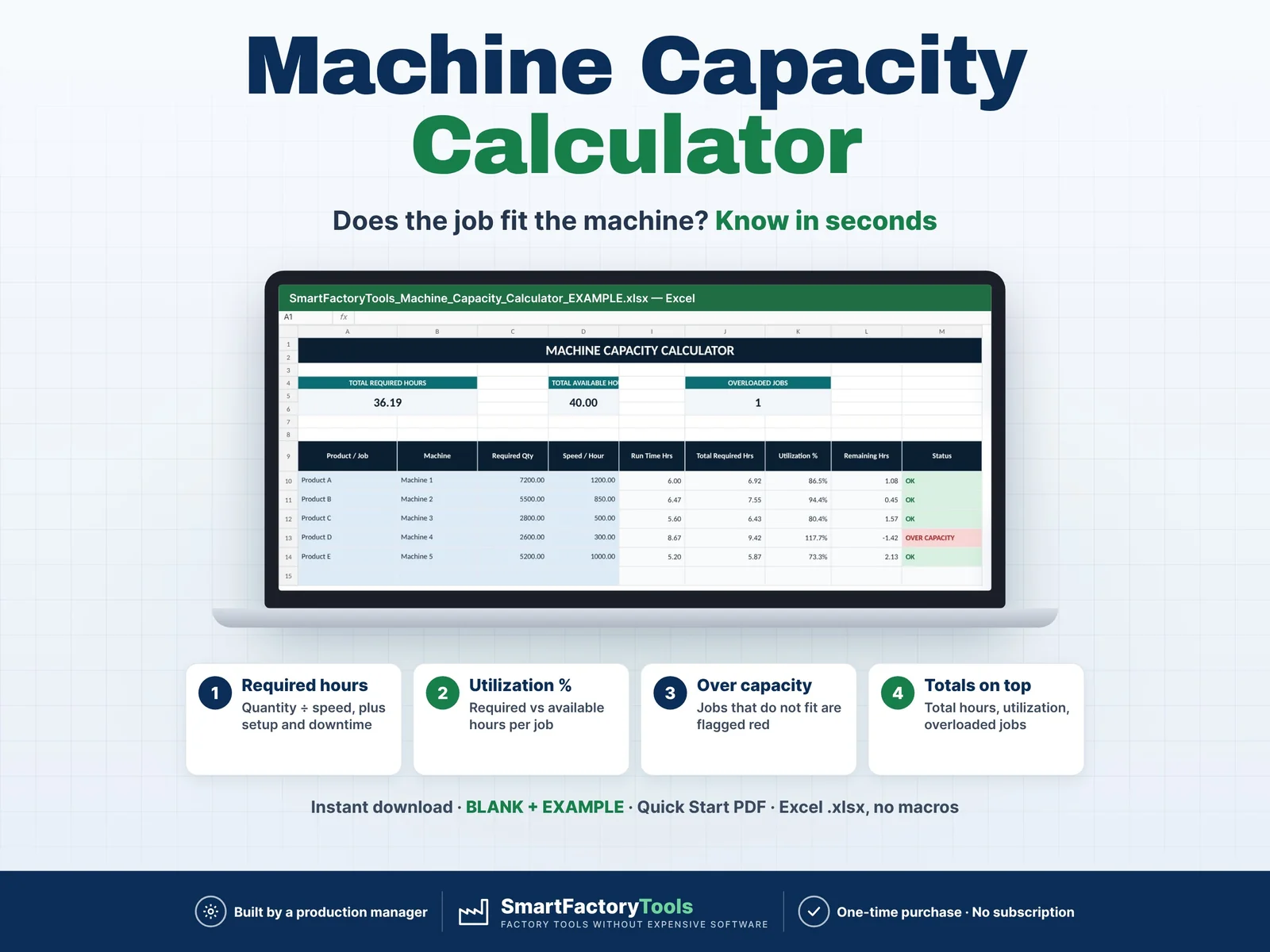
- Required hours = quantity ÷ speed, plus setup and downtime
- Utilization % per job – required vs available hours
- Jobs that do not fit flagged red
- Instant download: BLANK + EXAMPLE · Quick Start PDF
- Built by a production manager · one-time purchase, no subscription, no macros
▶ Requires Microsoft Excel on a Windows or Mac computer (Excel 2016 or newer). Not for Google Sheets, Apple Numbers or mobile apps.
Machine Capacity Calculator Excel Template
Quickly check whether your machines have enough available time for planned production.
Enter your required quantity, machine speed, available hours, setup time, changeover time and downtime — the template automatically calculates required hours, utilization and overload risk.
Designed for production planners, supervisors, operations managers and small manufacturing teams that need a simple capacity planning tool without complex software.
WHAT THIS TEMPLATE HELPS YOU DO
- Calculate required production hours
- Compare required time with available machine hours
- Calculate machine utilization %
- Identify overloaded jobs instantly
- See remaining machine capacity
- Include setup time
- Include changeover time
- Include planned downtime
- Check multiple production jobs in one view
- Make faster daily production planning decisions
WHAT’S INCLUDED
You will receive a ZIP file with:
- SmartFactoryTools_Machine_Capacity_Calculator_v1.2_BLANK.xlsx – sample machines in SETTINGS, empty job list for your own plan
- SmartFactoryTools_Machine_Capacity_Calculator_v1.2_EXAMPLE.xlsx – filled example: 5 jobs on 5 machines, one over capacity
- Quick_Start_Guide.pdf – 2-page setup guide
Each workbook contains:
- START – quick instructions and usage guide
- CALCULATOR – main machine capacity calculation screen
- SETTINGS – editable machine list and reference settings
- FAQ – answers to the most common questions
- LICENSE – terms of use
The workbooks include built-in formulas and clear visual status indicators; the EXAMPLE file shows sample data.
HOW IT WORKS
- Select or enter the machine
- Enter required production quantity
- Enter machine speed per hour
- Enter available machine hours
- Add setup, changeover and downtime minutes
- Review required hours, utilization, remaining capacity and status
The calculator automatically shows whether each planned job is:
OK
or
OVER CAPACITY
IDEAL FOR
- Production planners
- Production supervisors
- Manufacturing managers
- Operations managers
- Small manufacturers
- Packaging operations
- Assembly operations
- Workshops and production facilities
- Daily and shift capacity planning
FILE FORMAT
- ZIP file: two Microsoft Excel .xlsx workbooks (BLANK + EXAMPLE) and a PDF Quick Start Guide
- Digital download
- No physical product will be shipped
- Editable input fields
- Built-in formulas
- Ready to use immediately after download
For best results, use Microsoft Excel.
IMPORTANT
This is a digital Excel template.
You can customize the editable fields to fit your own machines and production environment.
Calculated areas are protected against accidental changes (no password).
The production data in the EXAMPLE file is for demonstration only – start your own plan in the BLANK file.
DIGITAL PRODUCT
Because this is a digital download, no physical item will be sent.
This template is intended for your own business or personal use. Redistribution, resale or sharing of the original template is not permitted.
 Production Planning