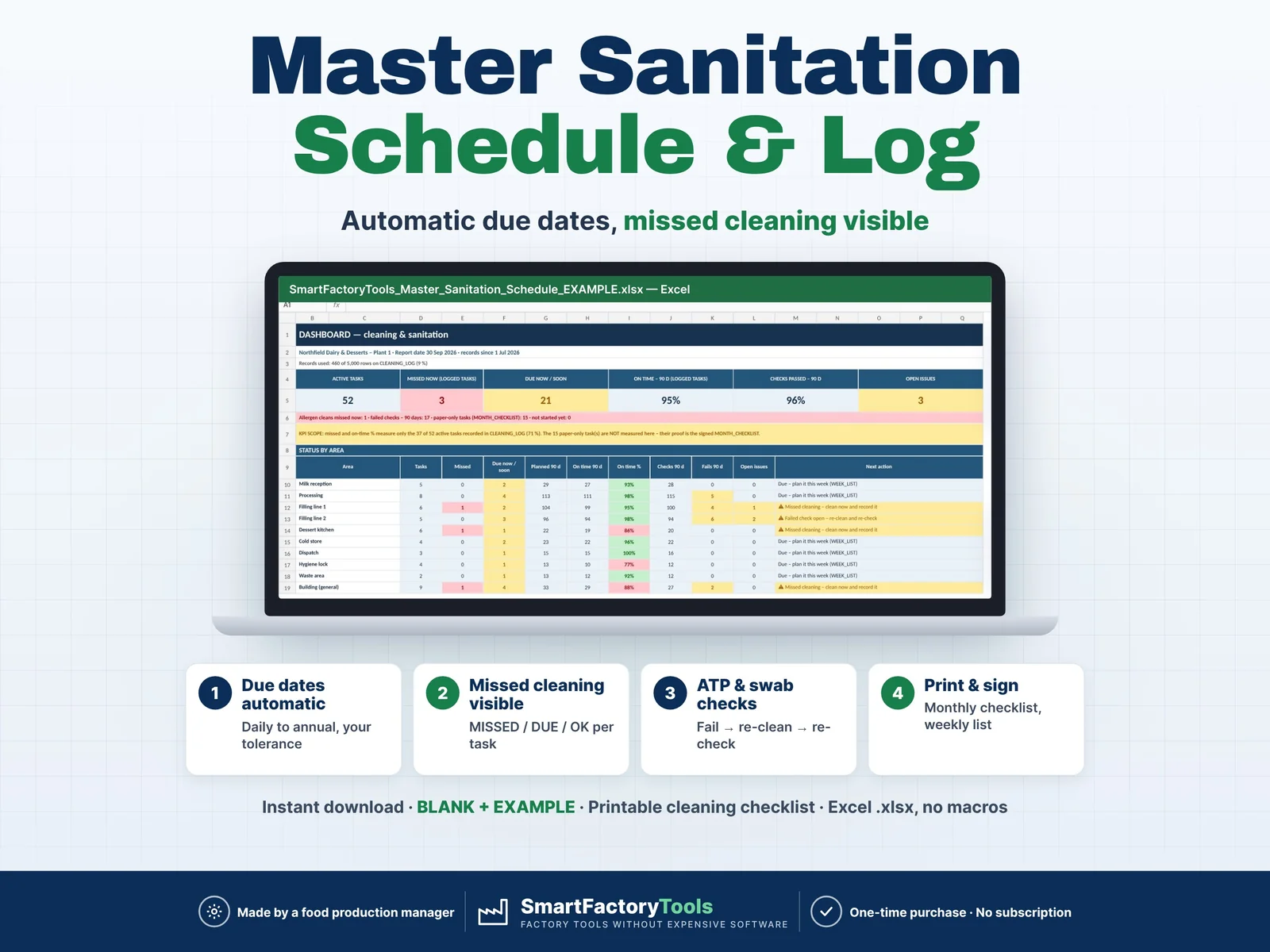
Plan every cleaning task once – Excel shows what is due, what was missed and whether the checks passed.
- Due dates calculated automatically – daily to annual, with your tolerance
- Missed cleaning visible: MISSED / DUE / OK per task
- ATP and swab checks: fail → re-clean → re-check
- Instant download: BLANK + EXAMPLE · Printable cleaning checklist
- Built by a food production manager · one-time purchase, no subscription, no macros
▶ Requires Microsoft Excel 2016 or newer on a computer (Windows or Mac). Not for Google Sheets, Apple Numbers or mobile apps.
A master sanitation schedule (MSS) and cleaning log for food and beverage plants, bakeries, dairies, central kitchens and caterers. Enter each cleaning task with its frequency and first due date – the next due dates, MISSED / DUE / OK status, on-time % and failed verifications are calculated for you. Print the weekly list and the monthly checklist for the cleaning team, record what was done, and see the gaps on the dashboard before the auditor does.
Built by a food production manager who runs cleaning schedules, ATP checks and audits in a real plant.
WHAT IT DOES
- Master sanitation schedule – up to 300 tasks: area, equipment / item, task, frequency, first due date, method / SSOP ref., chemical with concentration, contact time and PPE, responsible role, estimated minutes, verification method, allergen clean
- Automatic due dates – daily (open days only), weekly, 2-weekly, monthly, quarterly, 6-monthly, annual or your own frequencies, each with a ± tolerance (e.g. weekly ± 1 day)
- Status per task – MISSED · DUE / DUE TODAY · DUE SOON · OK · PAPER ONLY · NOT STARTED · INACTIVE
- Cleaning log – date done, task no., done by; the planned date is found automatically: On time / Late / Repeat
- Verification – visual, ATP (your pass and caution limits in RLU) or swab result in the same row; Fail → re-clean date → re-check → Closed
- Monthly checklist per area – tasks × 31 days: □ planned, ✓ done on time, L late, ✗ missed, closed days grey – print, initial, file
- Weekly list per area – all periodic cleans due this week incl. missed ones, with chemical, concentration, contact time, PPE and sign-off columns
- Week workload – planned cleaning hours per responsible role and day, compared with the hours you have; OVER days in red
- Dashboard – active tasks, missed now, due now / soon, on-time % (90 days), checks passed %, open issues, status by area, oldest missed cleaning, 12-month trend
WHAT'S INCLUDED (ZIP)
- SmartFactoryTools_Master_Sanitation_Schedule_v1.1_BLANK.xlsx – ready for your schedule
- SmartFactoryTools_Master_Sanitation_Schedule_v1.1_EXAMPLE.xlsx – fictional dairy & dessert plant, 52 tasks, July–September records
- Quick_Start_Guide.pdf – 2 pages
- Printable_Cleaning_Checklist.pdf – blank A4 monthly checklist (tasks × 31 days)
HOW IT WORKS
- SETUP – open weekdays, closed dates, people, areas, roles, frequencies with tolerance, chemicals, ATP limits (about 10 minutes)
- TASKS – one row per cleaning task with its frequency and first due date
- Print the weekly list and the monthly checklists, clean, record periodic cleans and checks on CLEANING_LOG
- DASHBOARD – see what is missed, due, late or failed – by area
DAILY CLEANING ON PAPER – YOUR CHOICE
Typing every daily clean is a lot of work. Set "Record in log" = No for daily production cleaning: it prints on the monthly checklist for the team to initial, and it is not counted as missed. Important: the dashboard KPI (missed, on-time %) then measures only the tasks recorded in the log – the dashboard shows how many of your active tasks that is. Paper-only tasks are proven by the signed checklist.
WHO IT'S FOR
- QA and hygiene managers, food safety teams
- Production and site managers in food and beverage plants, bakeries, dairies, meat and ready-meal producers
- Central kitchens and caterers with a cleaning plan to prove
- Anyone preparing for IFS, BRCGS, FSSC 22000, SQF or local inspections (the file does not replace those standards)
LIMITS
- Calendar-based plan (first due date + frequency). Cleaning after each production run is not planned automatically – record it in the log or use a daily task.
- Your methods, chemicals and limits – the file does not validate cleaning procedures and does not know local rules.
- Not included: chemical stock, SDS library, e-mail reminders, electronic signatures or audit trail.
- 300 tasks · 5,000 log rows · 25 areas · 12 frequencies · weekly list 60 tasks and monthly checklist 45 tasks per print – print per area for more.
- Sheets are protected without a password to prevent accidental damage – you can unprotect them (Review › Unprotect Sheet).
FAQ
Q: Does it work in Google Sheets or on an iPad?
A: No – it is built and tested for Microsoft Excel 2016 or newer on a computer.
Q: We cleaned a day late – is it counted as missed?
A: The task is no longer missed, but the cleaning counts as late in the on-time %.
Q: Can I use my own frequencies?
A: Yes – up to 12, in days, weeks, months or open days, each with its own tolerance.
Q: How do ATP results work?
A: Enter your pass and (optional) caution limit; ATP above the limit is a Fail that stays open until the re-check passes.
Q: Can I change the example data?
A: Use the BLANK file for your plant – the EXAMPLE file shows how a filled schedule looks.
DIGITAL DOWNLOAD
This is a digital product – nothing is shipped. After purchase, download the ZIP from Etsy (Purchases and reviews) on a computer, unzip it and open the BLANK file in Excel.
Related SmartFactoryTools templates: HACCP CCP Monitoring Log, Temperature Monitoring Log, Calibration Tracker, Non-Conformance (NCR) Log, CAPA Tracker.
LICENSE
For use in your own company or organisation (any number of sites and employees). Reselling, sharing or uploading the file to other websites is not permitted.
© SmartFactoryTools – Factory tools without expensive software.
 Lean & Continuous Improvement