Skip to content
SmartFactoryTools
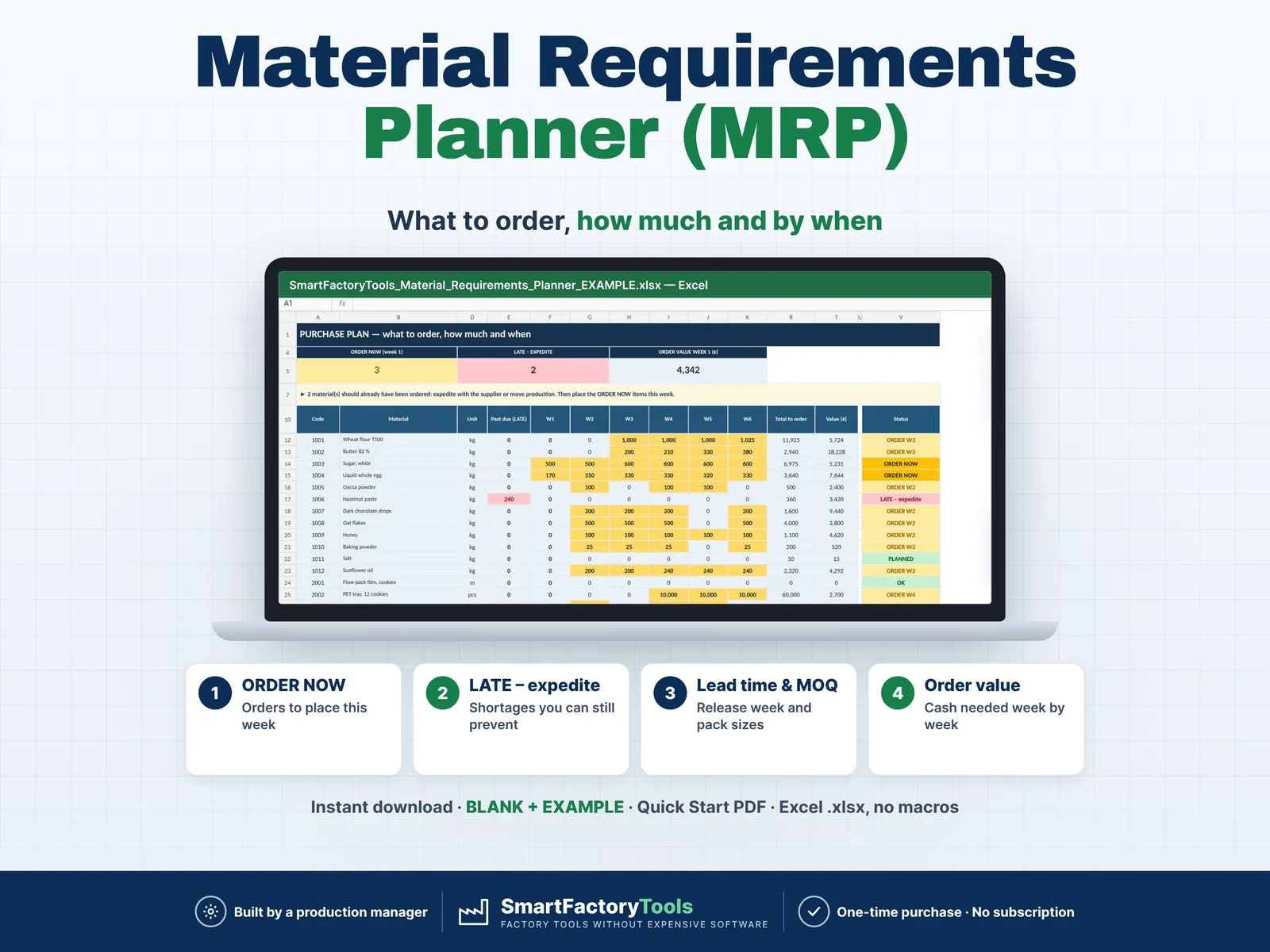
Material Requirements Planner – main listing image

Inventory & Materials

Material Requirements Planner

Enter your production plan, bills of materials, stock and open purchase orders – Excel calculates what to order, how much and in which week, 12 weeks ahead, with lead times, minimum order quantities and pack sizes.

€17.99

SKU: SFT-MRP-01 · Digital download (Microsoft Excel)

View on Etsy

Purchase and download through Etsy. Opens in a new tab.

Key features

  • BOM explosion: production plan × quantity per unit × (1 + waste allowance %) = gross requirement per material and week
  • Stock on hand, safety stock and open purchase orders netted week by week
  • Lead-time offset: planned order RELEASE = the week you must place the order
  • LATE – expedite: orders that should already have been placed are shown, never hidden
  • "Stock without new orders" row – the first week you would run short
  • PURCHASE_PLAN: every material with quantity per week, total, first shortage week, value and status (LATE · ORDER NOW · ORDER W2–W4 · PLANNED · OK)
  • Order value per week and for 12 weeks – the cash you need for purchasing
  • Error checks: product in the plan without a BOM, unknown or duplicate codes, negative or text inputs, past-due open orders, materials without a price
  • Drop-down lists with names for products and materials – codes are also accepted
  • Safety stock switch Yes / No

Main benefits

  • ORDER NOW list – orders to place this week
  • LATE – expedite: shortages you can still prevent
  • Lead time, MOQ and pack size – release week calculated
  • Instant download: BLANK + EXAMPLE · Quick Start PDF
  • Built by a production manager · one-time purchase, no subscription, no macros

Who this tool is for

  • Production planners, buyers and purchasing managers, production and plant managers, operations managers and owners of small manufacturing companies without an ERP system – food and bakery, cosmetics, packaging, furniture, assembly and other make-to-stock or make-to-order plants.

How it works

  • 1. SETUP: plan start date (Monday of week 1), currency, safety stock on or off.
  • 2. MATERIALS: stock on hand, safety stock, lead time in weeks, minimum order quantity, order multiple, price, supplier.
  • 3. PRODUCTS and BOM: what goes into one unit of each product.
  • 4. PRODUCTION_PLAN and OPEN_ORDERS: quantities per week and orders already placed.
  • 5. PURCHASE_PLAN: place the ORDER NOW items, expedite the LATE ones. The MRP sheet shows every step of the calculation.

What's included

  • SmartFactoryTools_Material_Requirements_Planner_v1.0_BLANK.xlsx – empty, ready for your plant
  • SmartFactoryTools_Material_Requirements_Planner_v1.0_EXAMPLE.xlsx – fictional bakery-snack plant: 20 materials, 8 products, 12-week plan, 6 open orders
  • Quick_Start_Guide.pdf – 2 pages: steps, formulas, statuses, top questions
  • Workbook sheets: START_HERE · SETUP · MATERIALS · PRODUCTS · BOM · PRODUCTION_PLAN · OPEN_ORDERS · MRP · PURCHASE_PLAN · FAQ · LICENSE

Software requirements

  • Requires Microsoft Excel 2016 or newer on a Windows or Mac computer. Not for Google Sheets, Apple Numbers or mobile apps.

Important limitations

  • 150 materials, 40 products, 600 BOM lines, 60 plan rows, 100 open orders, 12 weekly buckets
  • One BOM level: products made from purchased materials and packaging (no semi-finished sub-assemblies)
  • No unit conversion: stock, BOM, minimum order and open orders all in the unit of the material (kg, pcs, m)
  • No capacity planning, no supplier calendar, no ERP connection – a planning aid, confirm dates with your suppliers
  • No macros. Sheets are protected without a password to prevent accidental damage
Full product description

Enter your production plan, bills of materials, stock and open purchase orders – Excel calculates what to order, how much and in which week, 12 weeks ahead, with lead times, minimum order quantities and pack sizes.

  • ORDER NOW list – orders to place this week
  • LATE – expedite: shortages you can still prevent
  • Lead time, MOQ and pack size – release week calculated
  • Instant download: BLANK + EXAMPLE · Quick Start PDF
  • Built by a production manager · one-time purchase, no subscription, no macros

▶ Requires Microsoft Excel 2016 or newer on a Windows or Mac computer. Not for Google Sheets, Apple Numbers or mobile apps.

The line stops because the cartons did not arrive. Or the warehouse is full of film nobody needs for three months. Both come from the same problem: material orders are calculated by feeling, not from the production plan. This Material Requirements Planning (MRP) template does the calculation for you – the same logic as an ERP MRP run, in a spreadsheet you understand. Change the plan, a stock figure or a lead time, and the purchase plan updates instantly.

Built by a production manager who plans materials for a food factory every week.

WHAT IT DOES

  • BOM explosion: production plan × quantity per unit × (1 + waste allowance %) = gross requirement per material and week
  • Stock on hand, safety stock and open purchase orders netted week by week
  • Lead-time offset: planned order RELEASE = the week you must place the order
  • LATE – expedite: orders that should already have been placed are shown, never hidden
  • "Stock without new orders" row – the first week you would run short
  • PURCHASE_PLAN: every material with quantity per week, total, first shortage week, value and status (LATE · ORDER NOW · ORDER W2–W4 · PLANNED · OK)
  • Order value per week and for 12 weeks – the cash you need for purchasing
  • Error checks: product in the plan without a BOM, unknown or duplicate codes, negative or text inputs, past-due open orders, materials without a price
  • Drop-down lists with names for products and materials – codes are also accepted
  • Safety stock switch Yes / No

WHAT'S INCLUDED (ZIP)

  • SmartFactoryTools_Material_Requirements_Planner_v1.0_BLANK.xlsx – empty, ready for your plant
  • SmartFactoryTools_Material_Requirements_Planner_v1.0_EXAMPLE.xlsx – fictional bakery-snack plant: 20 materials, 8 products, 12-week plan, 6 open orders
  • Quick_Start_Guide.pdf – 2 pages: steps, formulas, statuses, top questions

Workbook sheets: START_HERE · SETUP · MATERIALS · PRODUCTS · BOM · PRODUCTION_PLAN · OPEN_ORDERS · MRP · PURCHASE_PLAN · FAQ · LICENSE

HOW IT WORKS

  1. SETUP: plan start date (Monday of week 1), currency, safety stock on or off.
  2. MATERIALS: stock on hand, safety stock, lead time in weeks, minimum order quantity, order multiple, price, supplier.
  3. PRODUCTS and BOM: what goes into one unit of each product.
  4. PRODUCTION_PLAN and OPEN_ORDERS: quantities per week and orders already placed.
  5. PURCHASE_PLAN: place the ORDER NOW items, expedite the LATE ones. The MRP sheet shows every step of the calculation.

WHO IT'S FOR

Production planners, buyers and purchasing managers, production and plant managers, operations managers and owners of small manufacturing companies without an ERP system – food and bakery, cosmetics, packaging, furniture, assembly and other make-to-stock or make-to-order plants.

LIMITS

  • 150 materials, 40 products, 600 BOM lines, 60 plan rows, 100 open orders, 12 weekly buckets
  • One BOM level: products made from purchased materials and packaging (no semi-finished sub-assemblies)
  • No unit conversion: stock, BOM, minimum order and open orders all in the unit of the material (kg, pcs, m)
  • No capacity planning, no supplier calendar, no ERP connection – a planning aid, confirm dates with your suppliers
  • No macros. Sheets are protected without a password to prevent accidental damage

FAQ

Q: Does it work in Google Sheets?

A: No. It is built and tested for Microsoft Excel 2016 or newer on Windows or Mac desktop.

Q: Can I plan by month?

A: The plan has 12 weekly buckets. Enter monthly quantities in every 4th week.

Q: Extra allowance % or yield?

A: Allowance = extra material: 100 kg + 10 % = 110 kg. If you know a 90 % yield, enter the gross quantity and 0 %.

Q: How do I use it every week?

A: Update stock, move the start date, update the plan and open orders, then place the ORDER NOW items.

Related SmartFactoryTools tools: Weekly Production Schedule & Gantt Planner · Manufacturing Capacity Planner · Manufacturing Cost per Unit Calculator · Multi-Level Product Costing.

DIGITAL DOWNLOAD

This is a digital product – nothing is shipped. After purchase, download the ZIP from Etsy (Purchases and Reviews) on a computer, unzip it and open the files in Excel.

LICENSE

For use within your own company or organisation, at any number of sites. Reselling, sharing or uploading the template is not permitted. © SmartFactoryTools
Related tools

Manufacturing Capacity Planner – main listing imageProduction Planning

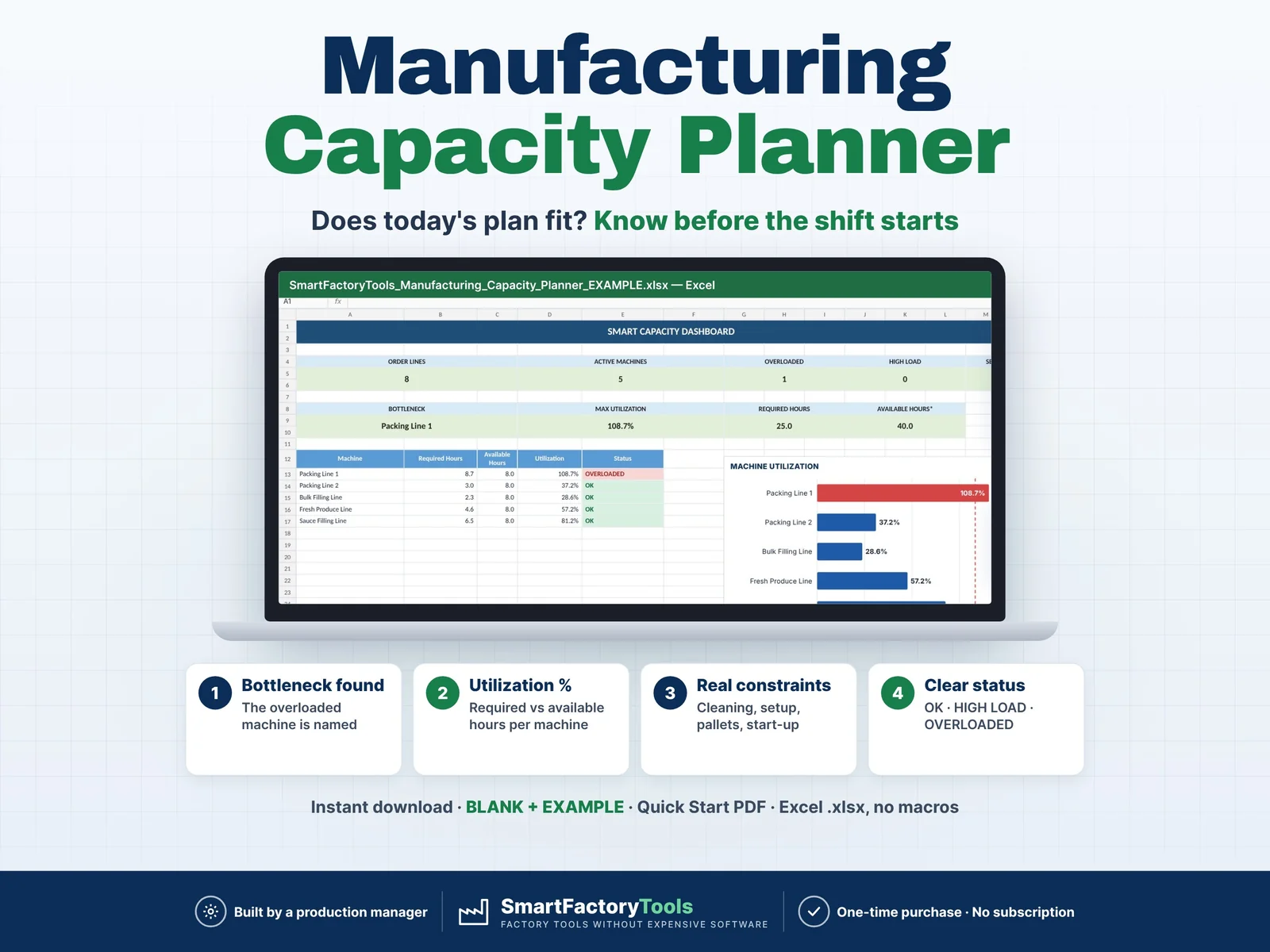
Manufacturing Capacity Planner

Plan your daily production capacity, identify bottlenecks, and check whether your production plan fits your available machine time before the shift starts. This Excel template goes beyond a simple Quantity ÷ Speed calculation. It includes real manufacturing constraints such as cleaning/changeovers, machine setup time, pallet handling, packaging changes, startup, shutdown, planned stops, and product-specific delays.

€19.99

View details
Machine Capacity Calculator – main listing imageProduction Planning

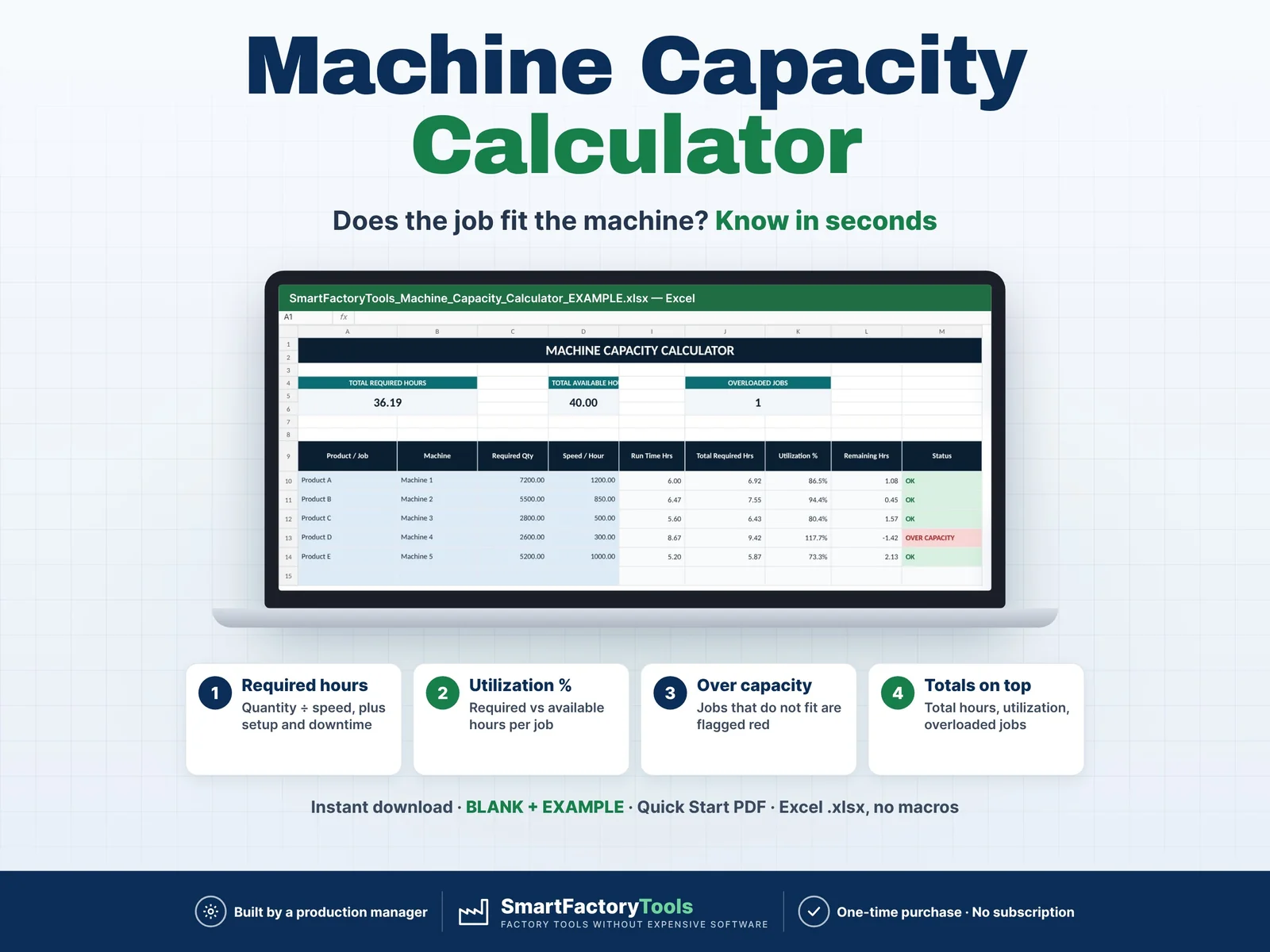
Machine Capacity Calculator

Quickly check whether your machines have enough available time for planned production. Enter your required quantity, machine speed, available hours, setup time, changeover time and downtime — the template automatically calculates required hours, utilization and overload risk. Designed for production planners, supervisors, operations managers and small manufacturing teams that need a simple capacity planning tool without complex software.

€7.99

View details
Line Capacity Planner – main listing imageProduction Planning

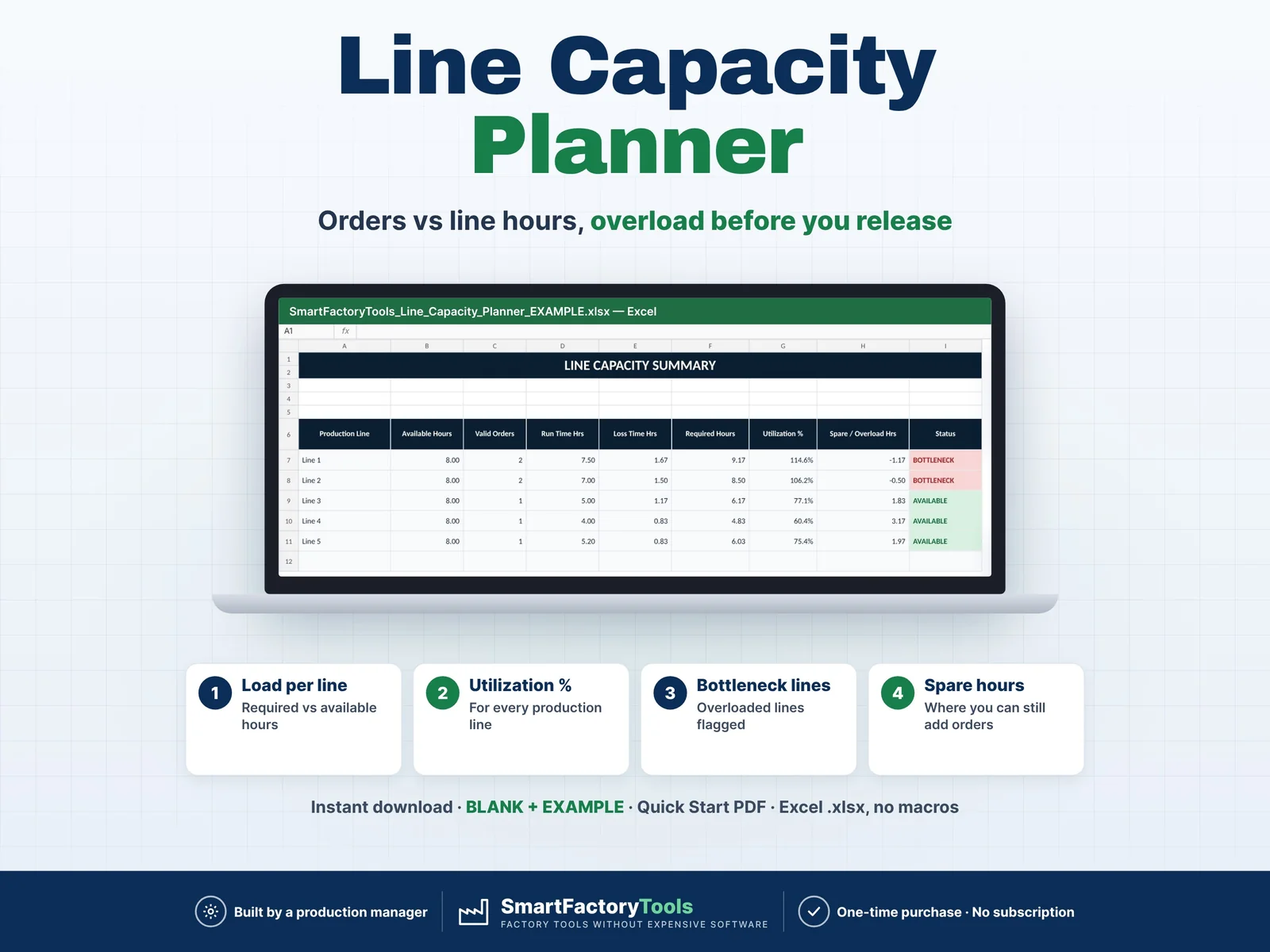
Line Capacity Planner

Turn your production orders into a clear line-by-line capacity plan. Enter your production orders, assign each order to a production line, add demand quantities, production rates, setup time, changeover time and other planned losses — the workbook automatically calculates the required hours for each order and summarizes the total workload by production line. Quickly see which lines have spare capacity and which lines are becoming bottlenecks before the production plan is released.

€7.99

View details