Skip to content
SmartFactoryTools
Plan vs Actual Production Tracker – main listing image

Operations Reporting

Plan vs Actual Production Tracker

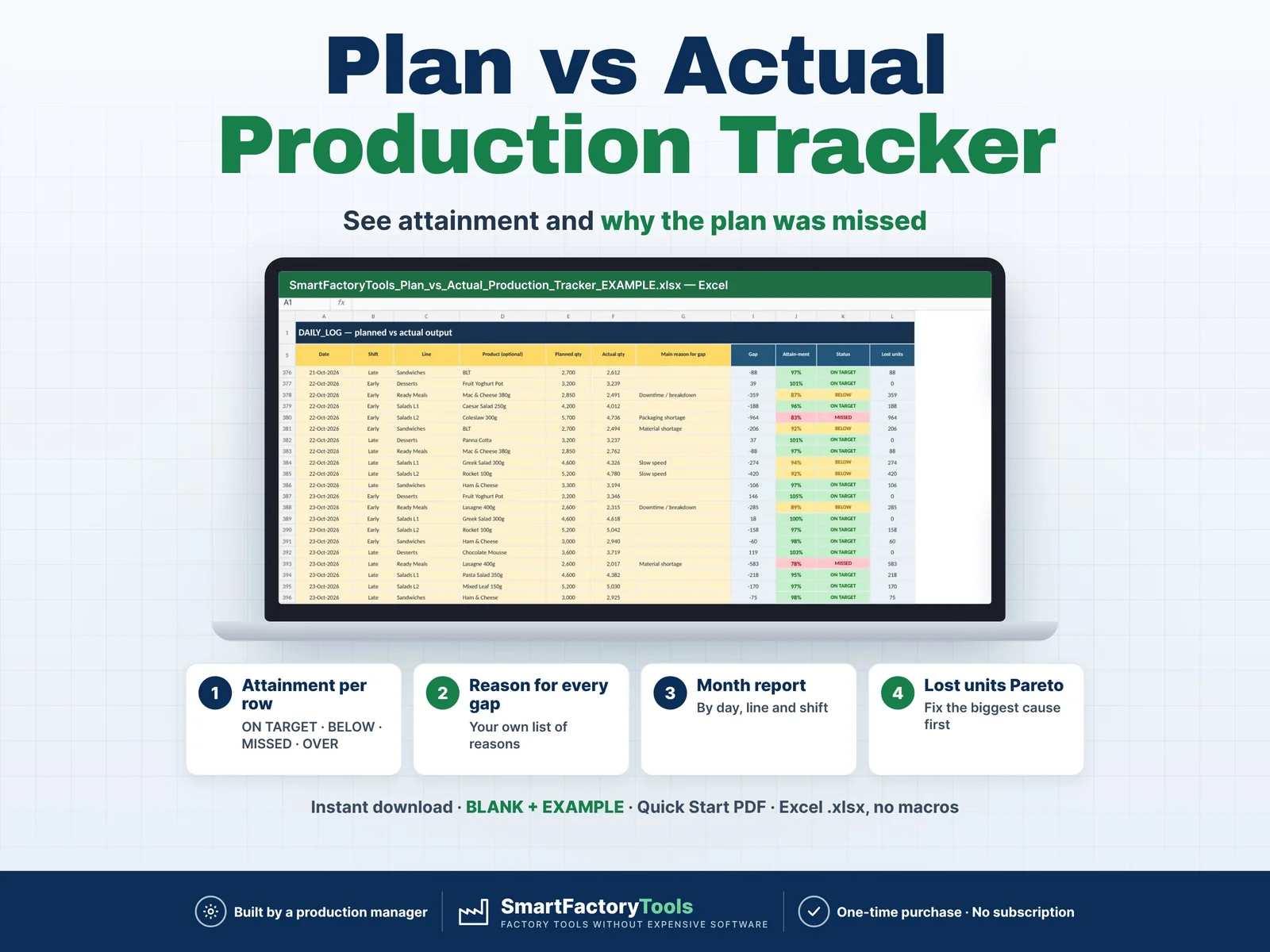
Enter the planned and actual quantity for every shift — Excel shows the attainment, the month-to-date gap per line and shift, and why the plan was missed.

€9.99

SKU: SFT-PVA-01 · Digital download (Microsoft Excel)

View on Etsy

Purchase and download through Etsy. Opens in a new tab.

Key features

  • One continuous log: date, shift, line, product (optional), planned qty, actual qty, main reason, comment
  • Attainment and status for every row: ON TARGET · BELOW · MISSED · OVER (over-production) · UNPLANNED
  • Lost units = plan − actual, assigned to the reason you choose
  • Your own reasons list (downtime, material shortage, staff shortage, quality, changeover, slow speed …)
  • Plans can be entered in advance — a row counts when the actual is entered
  • MONTH REPORT for any month: planned, actual, attainment %, days on target, lost units, top reason
  • By day with cumulative plan vs actual · by line (with each line's top reason) · by shift
  • Pareto of lost units by reason with share and cumulative %
  • Charts: cumulative plan vs actual and lost units by reason
  • Data checks: unknown line / shift / product, duplicate rows, missing reason for a gap, negative quantities, mixed units warning

Main benefits

  • Attainment per shift: ON TARGET · BELOW · MISSED · OVER
  • A reason for every gap, from your own list
  • Lost-units Pareto – fix the biggest cause first
  • Instant download: BLANK + EXAMPLE · Quick Start PDF
  • Built by a production manager · one-time purchase, no subscription, no macros

Who this tool is for

  • Production managers · Shift leaders · Plant and operations managers · Production planners · Food, packaging, assembly, plastics and contract-packing plants.

How it works

  • 1. Set up your lines (with unit), shifts, reasons and target %
  • 2. Log planned and actual quantity for every shift
  • 3. Choose the main reason when the plan is missed
  • 4. Open the month report — by day, line, shift and reason
  • WORKS WITH OTHER SMARTFACTORYTOOLS TOOLS (optional)
  • DAILY_LOG can be filled from the SmartFactoryTools Shift Report (EXPORT_PVA) – plans and actuals are typed once
  • IMPORT_SETUP: shared setup of the Production Performance Bundle – site, lines, shifts, reasons and products in one paste
  • Only this file? Ignore these sheets – nothing else changes. Nothing is linked: copy one named block, Paste Values.

What's included

  • BLANK workbook — ready for your plant
  • EXAMPLE workbook — fictional food plant, 5 lines, 2 shifts, two months of data
  • Quick Start Guide (PDF, 2 pages)
  • Sheets: START_HERE · SETUP · DAILY_LOG · MONTH_REPORT · IMPORT_SETUP · FAQ · LICENSE

Software requirements

  • REQUIRES MICROSOFT EXCEL (DESKTOP) 2016 OR NEWER — Windows or Mac. Not for Google Sheets, Apple Numbers or mobile apps.

Important limitations

  • Tracks output against plan — no downtime minutes or OEE (see our Downtime & OEE trackers)
  • No production scheduling
  • Plant totals are meaningful when all lines use the same unit (a warning appears otherwise)
  • Up to 20 lines · 3 shifts · 15 reasons · 100 products · 5,000 log rows
  • Fully editable inputs. Custom work is not offered.
Full product description

Enter the planned and actual quantity for every shift — Excel shows the attainment, the month-to-date gap per line and shift, and why the plan was missed.

  • Attainment per shift: ON TARGET · BELOW · MISSED · OVER
  • A reason for every gap, from your own list
  • Lost-units Pareto – fix the biggest cause first
  • Instant download: BLANK + EXAMPLE · Quick Start PDF
  • Built by a production manager · one-time purchase, no subscription, no macros

▶ REQUIRES MICROSOFT EXCEL (DESKTOP) 2016 OR NEWER — Windows or Mac.

Not for Google Sheets, Apple Numbers or mobile apps.

The SmartFactoryTools Plan vs Actual Production Tracker replaces the whiteboard and the messy daily sheet: two numbers per shift and the main reason for any gap — and the month report builds itself.

No macros. No subscription. Built by a production manager who reports plan vs actual every day.

WHAT IT DOES

  • One continuous log: date, shift, line, product (optional), planned qty, actual qty, main reason, comment
  • Attainment and status for every row: ON TARGET · BELOW · MISSED · OVER (over-production) · UNPLANNED
  • Lost units = plan − actual, assigned to the reason you choose
  • Your own reasons list (downtime, material shortage, staff shortage, quality, changeover, slow speed …)
  • Plans can be entered in advance — a row counts when the actual is entered
  • MONTH REPORT for any month: planned, actual, attainment %, days on target, lost units, top reason
  • By day with cumulative plan vs actual · by line (with each line's top reason) · by shift
  • Pareto of lost units by reason with share and cumulative %
  • Charts: cumulative plan vs actual and lost units by reason
  • Data checks: unknown line / shift / product, duplicate rows, missing reason for a gap, negative quantities, mixed units warning

WHAT'S INCLUDED (ZIP)

  • BLANK workbook — ready for your plant
  • EXAMPLE workbook — fictional food plant, 5 lines, 2 shifts, two months of data
  • Quick Start Guide (PDF, 2 pages)

Sheets: START_HERE · SETUP · DAILY_LOG · MONTH_REPORT · IMPORT_SETUP · FAQ · LICENSE

HOW IT WORKS

  1. Set up your lines (with unit), shifts, reasons and target %
  2. Log planned and actual quantity for every shift
  3. Choose the main reason when the plan is missed
  4. Open the month report — by day, line, shift and reason

WORKS WITH OTHER SMARTFACTORYTOOLS TOOLS (optional)

  • DAILY_LOG can be filled from the SmartFactoryTools Shift Report (EXPORT_PVA) – plans and actuals are typed once
  • IMPORT_SETUP: shared setup of the Production Performance Bundle – site, lines, shifts, reasons and products in one paste
  • Only this file? Ignore these sheets – nothing else changes. Nothing is linked: copy one named block, Paste Values.

WHO IT'S FOR

Production managers · Shift leaders · Plant and operations managers · Production planners · Food, packaging, assembly, plastics and contract-packing plants.

LIMITS

  • Tracks output against plan — no downtime minutes or OEE (see our Downtime & OEE trackers)
  • No production scheduling
  • Plant totals are meaningful when all lines use the same unit (a warning appears otherwise)
  • Up to 20 lines · 3 shifts · 15 reasons · 100 products · 5,000 log rows
  • Fully editable inputs. Custom work is not offered.

FAQ

Q: Does it work in Google Sheets or on an iPad?

A: No. It is built and tested for Microsoft Excel 2016 or newer on Windows or Mac desktop.

Q: Do I need a new file every month?

A: No. One continuous log — choose the month you want to see in SETUP.

Q: Do I have to enter products?

A: No. Products are optional — you can track per line and shift only.

Q: Is the file locked?

A: Formulas are protected against accidental changes, without a password. Your input cells are always editable.

DIGITAL DOWNLOAD

This is a digital product. No physical item will be shipped. After purchase, download the ZIP from your Etsy account on a computer, unzip it and open the workbook in Excel.

LICENSE

For use within your own company or organisation. Resale, sharing or redistribution of the template is not permitted.

© SmartFactoryTools
Related tools

Machine Downtime Log – main listing imageMaintenance

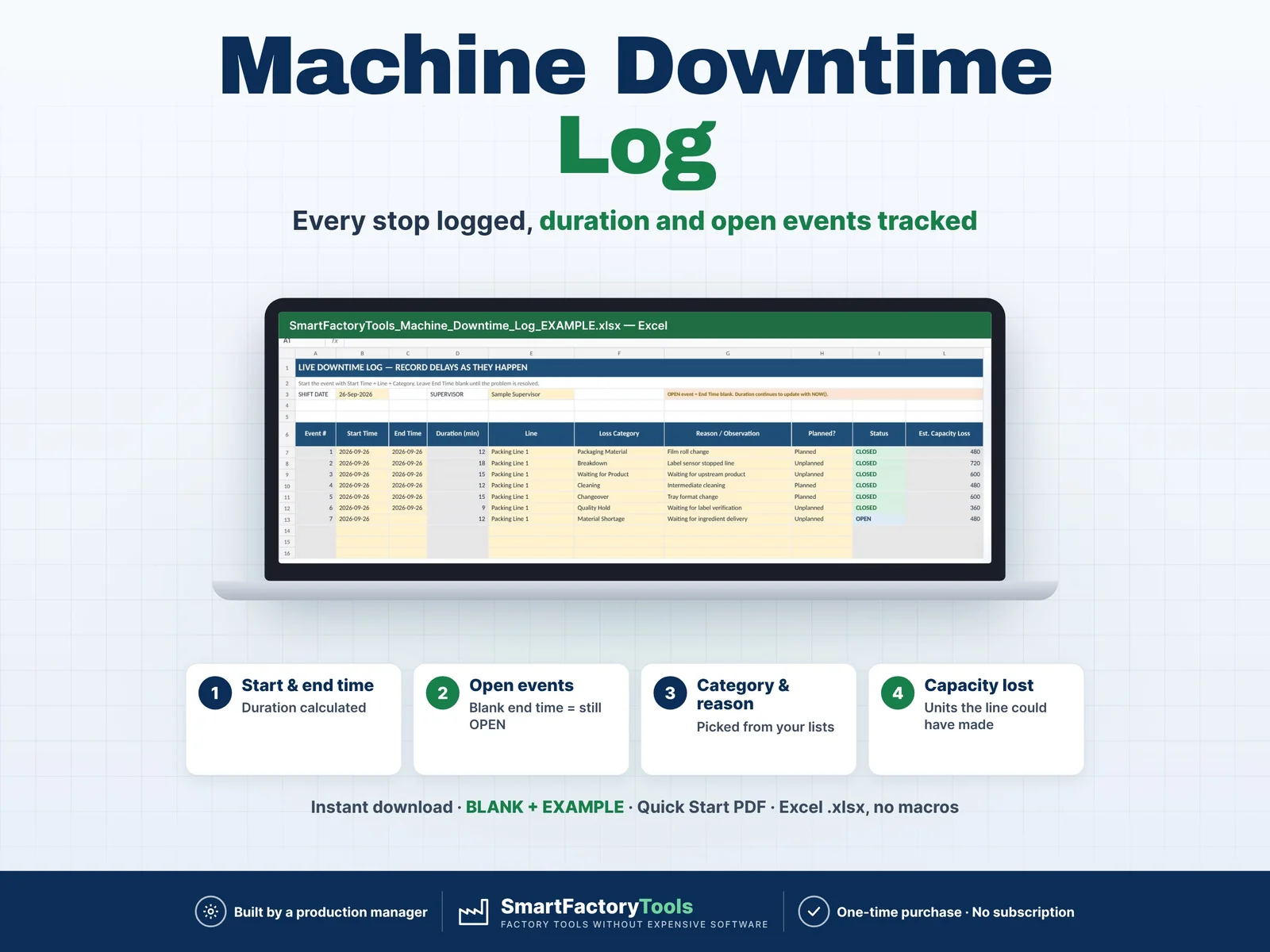
Machine Downtime Log

Track production delays as they happen and understand where your shift time is being lost. The SmartFactoryTools Machine Downtime Log is a practical Excel tool for supervisors, production managers and manufacturing teams who need a simple way to record downtime events during a shift. Enter each delay when it happens, select the production line and downtime category, and record the reason. The workbook automatically calculates downtime duration, tracks open events and summarizes the impact on productive time and estimated production capacity. No macros. No complicated production software.

€9.99

View details
OEE Calculator & Shift OEE Tracker – main listing imageOperations Reporting

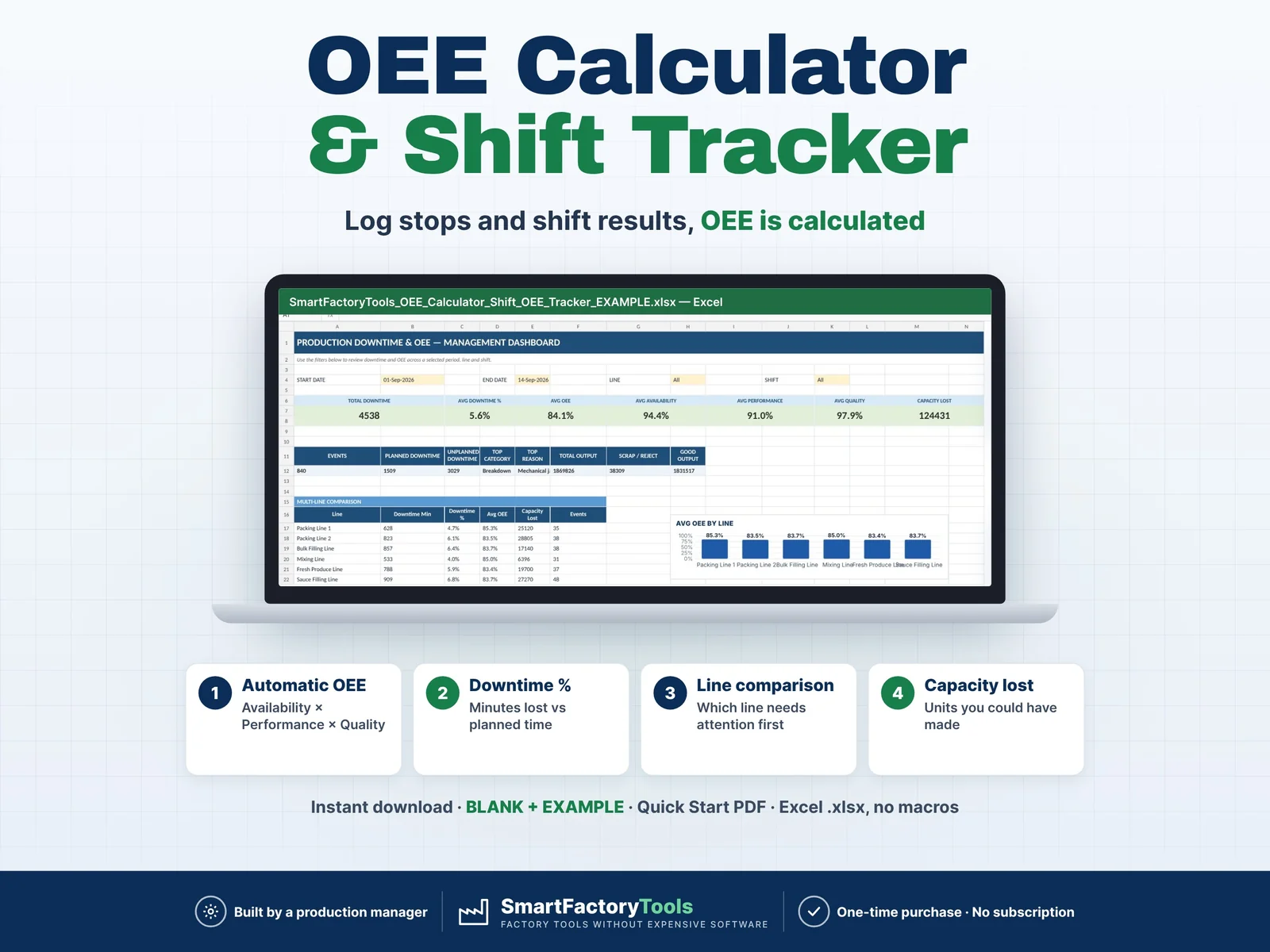
OEE Calculator & Shift OEE Tracker

Track production downtime, shift performance and OEE in one structured Excel workbook built for real manufacturing environments. The SmartFactoryTools OEE Calculator & Shift OEE Tracker helps production managers, supervisors and continuous improvement teams record production losses, calculate OEE automatically and identify the biggest causes of downtime. Instead of maintaining separate downtime logs, shift reports and KPI spreadsheets, the workbook connects your daily production records directly to visual dashboards and Pareto analysis.

€17.99

View details
OEE Dashboard & Downtime Cost Tracker – main listing imageOperations Reporting

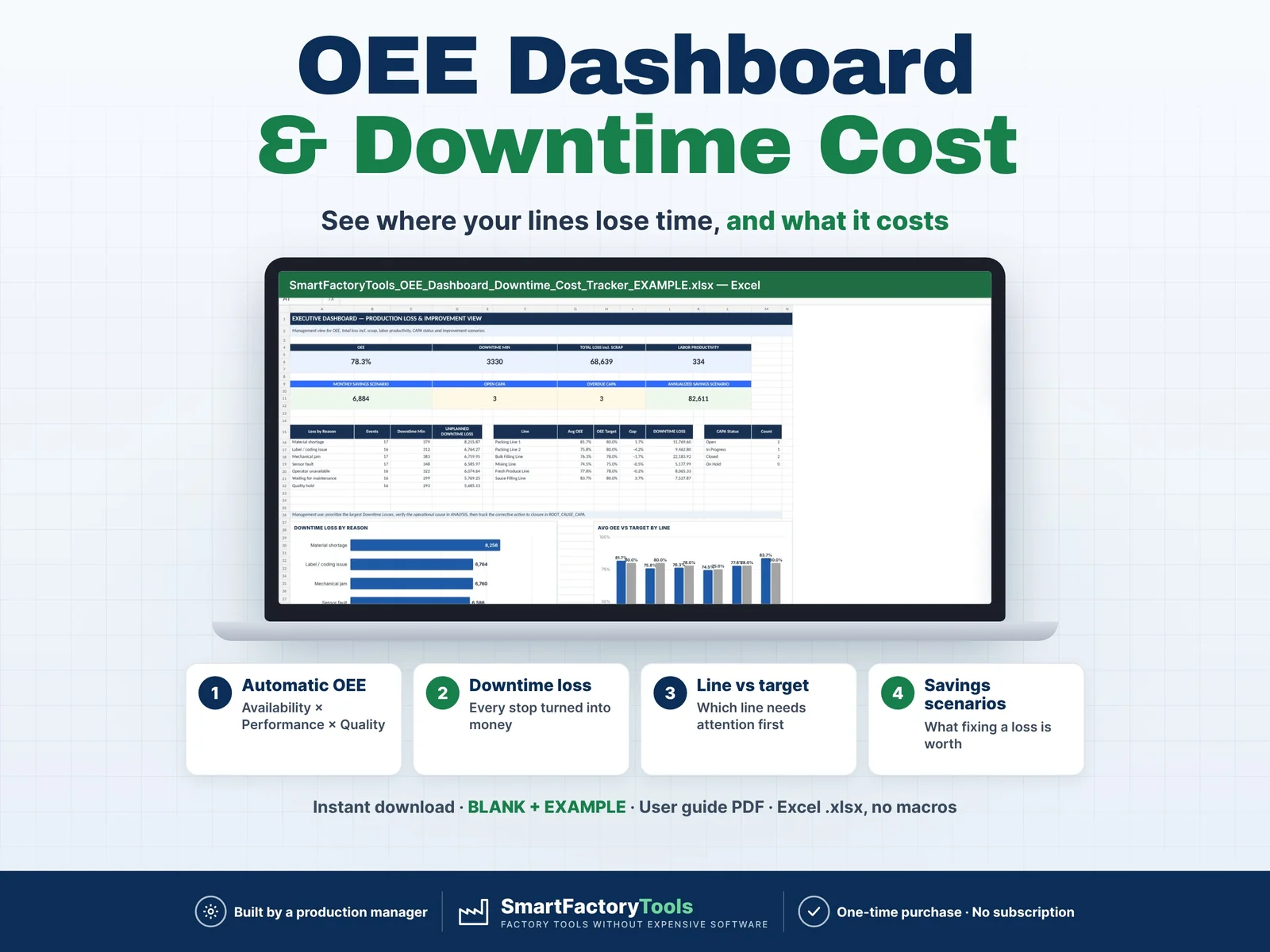
OEE Dashboard & Downtime Cost Tracker

Manufacturing OEE Tracker Excel Template for production downtime, OEE analysis, CAPA, MTTR/MTBF, cost impact and improvement savings. SmartFactoryTools OEE Dashboard & Downtime Cost Tracker is a practical Microsoft Excel workbook built for production managers, supervisors, maintenance teams, Lean / Continuous Improvement professionals and manufacturing businesses that need more than a simple downtime log. Record daily production stops, enter shift results and let the workbook calculate key production KPIs automatically — then use Pareto analysis, root cause tracking, reliability metrics and financial scenarios to decide what to improve next.

€28.99

View details