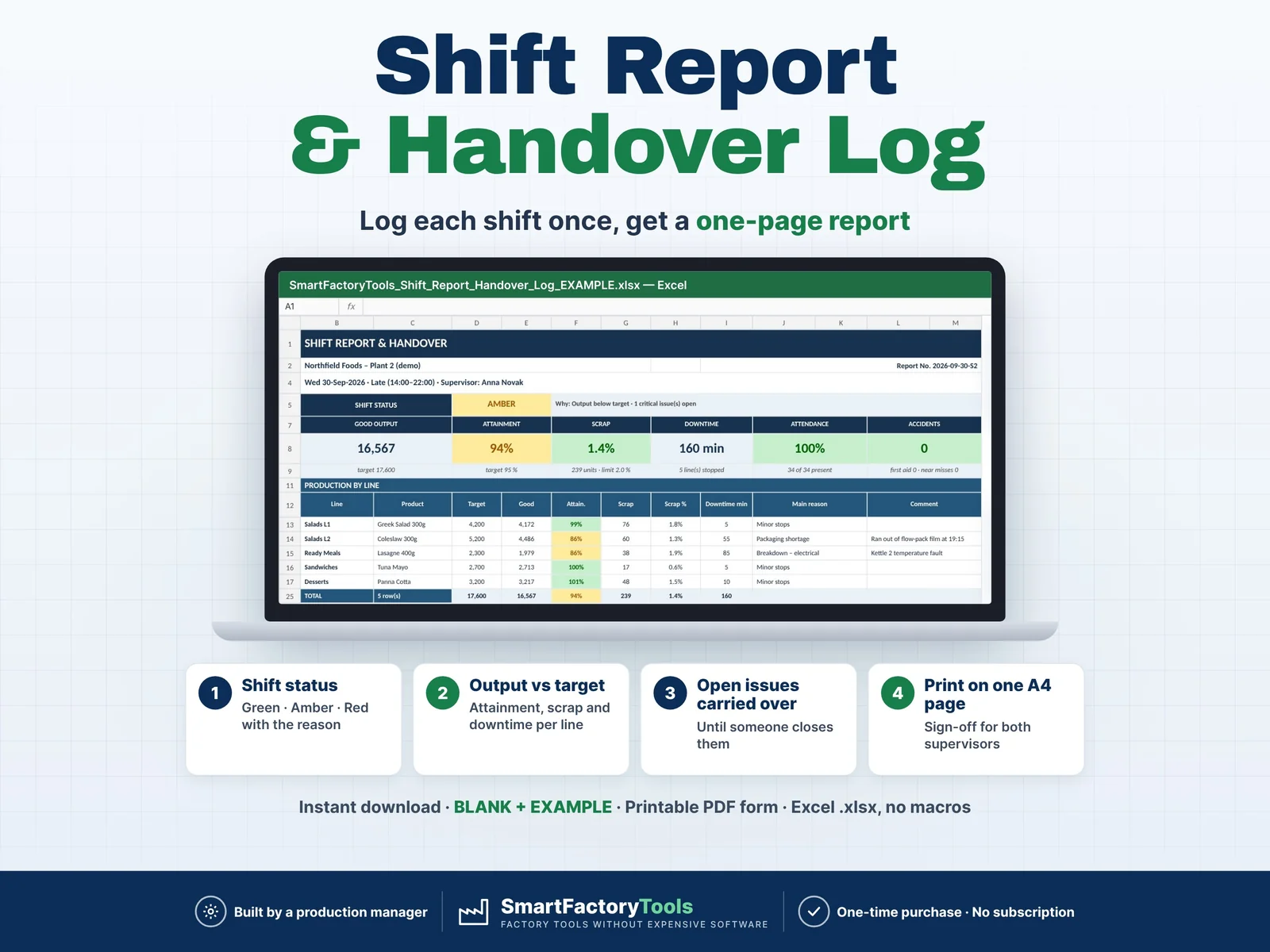
Hand over every shift on one page – output, scrap, downtime, staffing, safety and every open issue the next shift must know.
- Shift status green / amber / red – with the reason
- Output vs target: attainment, scrap and downtime per line
- Open issues carried over until someone closes them
- Instant download: BLANK + EXAMPLE · Printable PDF form
- Built by a production manager · one-time purchase, no subscription, no macros
▶ Requires Microsoft Excel 2016 or newer on a Windows or Mac computer. Not for Google Sheets, Apple Numbers or mobile apps.
Most shift handovers are verbal or on paper. The next shift does not know the kettle is still on manual control, that film runs out at 19:00 or that a near miss happened at dock door 2 – and the manager collects the numbers from three places. This Excel template turns a few rows at the end of each shift into a clean one-page shift report, and keeps every open issue on the report until someone closes it.
Built by a production manager in a food factory who hands over shifts every day.
WHAT IT DOES
- Shift status GREEN / AMBER / RED – with the reason why (output below target, scrap above limit, low attendance, accident, critical issue still open)
- Output by line: target, good quantity, attainment %, scrap %, downtime minutes and main reason
- Top 3 downtime of the shift, sorted by minutes
- Issues raised this shift: type, line or area, what happened, action, owner, status
- Open issues carried over from earlier shifts – oldest first, with days open – until they are closed
- Staffing and safety: planned and present staff, temps, overtime, attendance, accidents, first aid, near misses
- Handover notes and sign-off for outgoing and incoming supervisor
- Prints on one A4 page – or save it as PDF and send it
- Choose any older date and shift to see that report again (history stays correct)
- MONTH LOG: every shift of the month in one table with status, KPIs and an attainment-by-day chart
- Check column on every log row: missing data, duplicates, unknown lines or shifts
WHAT'S INCLUDED
- SmartFactoryTools_Shift_Report_Handover_Log_v1.3_BLANK.xlsx – ready for your plant
- SmartFactoryTools_Shift_Report_Handover_Log_v1.3_EXAMPLE.xlsx – fictional food plant, 5 lines, 3 shifts, 5 weeks of data
- Printable_Shift_Handover_Form.pdf – blank one-page form for shifts that still write by hand
- Quick_Start_Guide.pdf – 2 pages
Sheets: START_HERE, SETUP, SHIFTS, PRODUCTION, ISSUES, SHIFT_REPORT, MONTH_LOG, EXPORT_PVA, EXPORT_OEE, MONTH_TOTALS, IMPORT_SETUP, FAQ, LICENSE
HOW IT WORKS
- SETUP (once): your shifts, lines with unit, supervisors, downtime reasons, issue types, targets
- SHIFTS: one row per shift – supervisor, staffing, safety numbers, handover notes
- PRODUCTION: one row per line – target, good, scrap, downtime minutes and reason
- ISSUES: anything the next shift must know – keep it Open until it is solved
- SHIFT_REPORT opens on the latest shift automatically. Print it or choose another date.
Yellow cells are your input. Everything else is calculated and protected against accidental changes.
WORKS WITH OTHER SMARTFACTORYTOOLS TOOLS (optional)
- EXPORT_PVA: your production rows in the layout of the Plan vs Actual Production Tracker – one paste, no retyping
- EXPORT_OEE: output and scrap per line and shift for the OEE Calculator & Shift OEE Tracker
- MONTH_TOTALS: one month in the Production KPI Dashboard columns (output per line, injuries, near misses, people hours)
- IMPORT_SETUP: shared setup of the Production Performance Bundle – site, shifts, lines, supervisors and reasons in one paste
- Only this file? Ignore these sheets – nothing else changes. Nothing is linked: copy one named block, Paste Values.
WHO IT'S FOR
Shift leaders, production supervisors, team leaders, production and operations managers in food and drink, packaging, assembly, plastics, bakery and contract packing – any plant that runs shifts without an MES.
LIMITS
- Up to 4 shifts a day, 20 lines, 20 supervisors, 15 downtime reasons, 10 issue types
- 1,500 shifts, 6,000 line rows and 2,000 issues per workbook (about one year with 3 shifts and 5 lines)
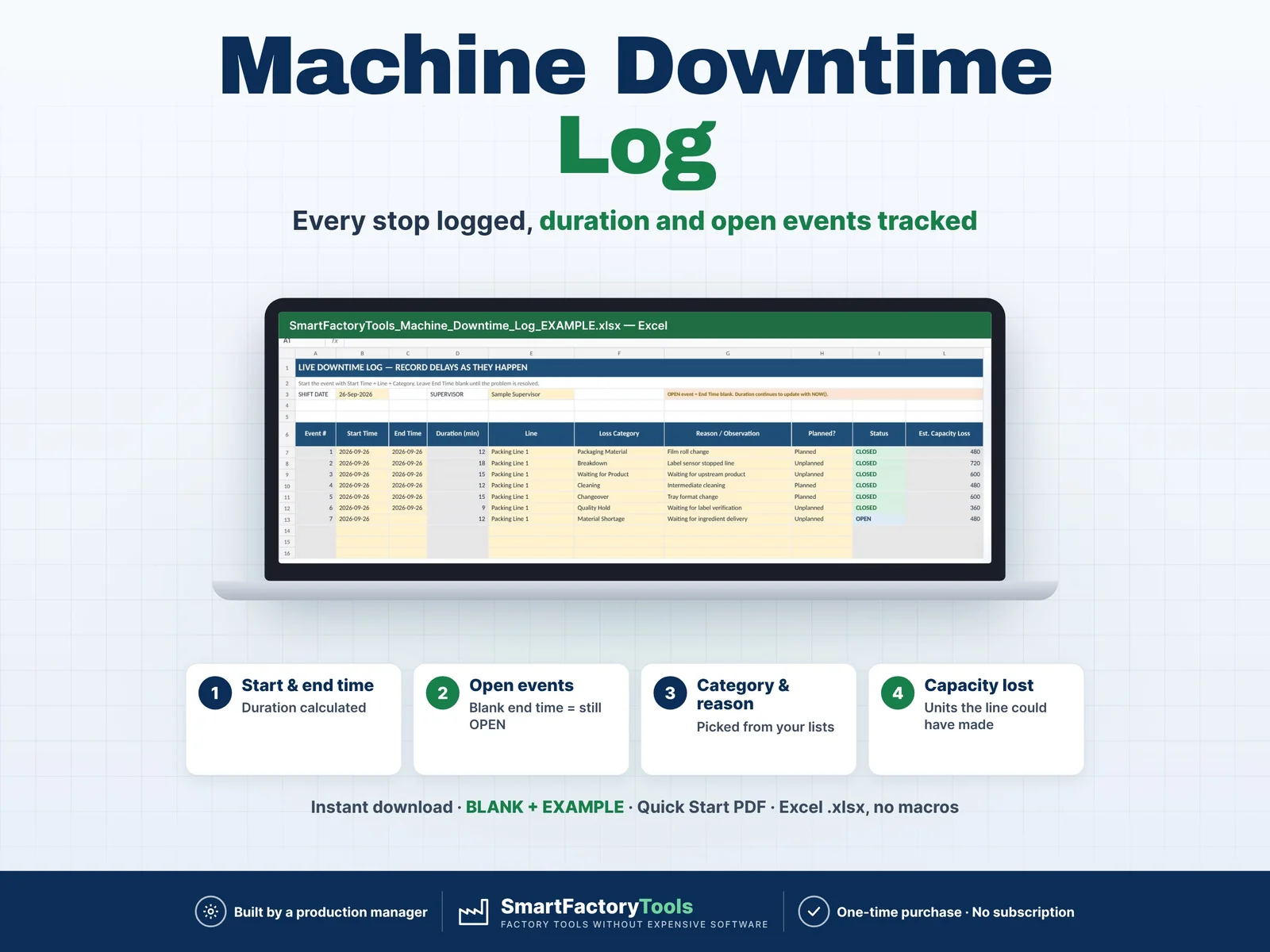
- One main downtime reason per line per shift – no OEE or detailed stop log (see the SmartFactoryTools Downtime & OEE trackers)
- Staffing is headcount only – no time and attendance or payroll
- No macros: the report is a live view of the logs, signatures are on paper
- Does not replace your legal incident-reporting or food-safety records
FAQ
Night shift past midnight? Log it on the date the shift started.
Several products on one line? One row per product – totals include all.
Print an older shift? Type the date and choose the shift on SHIFT_REPORT.
Can I change the protection? Yes – sheets are protected without a password (Review › Unprotect Sheet).
Do I need to create a new file every month? No – one continuous log, choose the month in MONTH_LOG.
DIGITAL DOWNLOAD
This is an instant digital download (ZIP). Nothing is shipped. Download it on a computer, unzip it and open the files in Excel.
LICENSE
For use within your own company or organisation, at any number of sites. Reselling, sharing or uploading the template is not permitted. © SmartFactoryTools
 Maintenance