Skip to content
SmartFactoryTools
Vacation & Absence Planner – main listing image

Workforce & Shifts

Vacation & Absence Planner

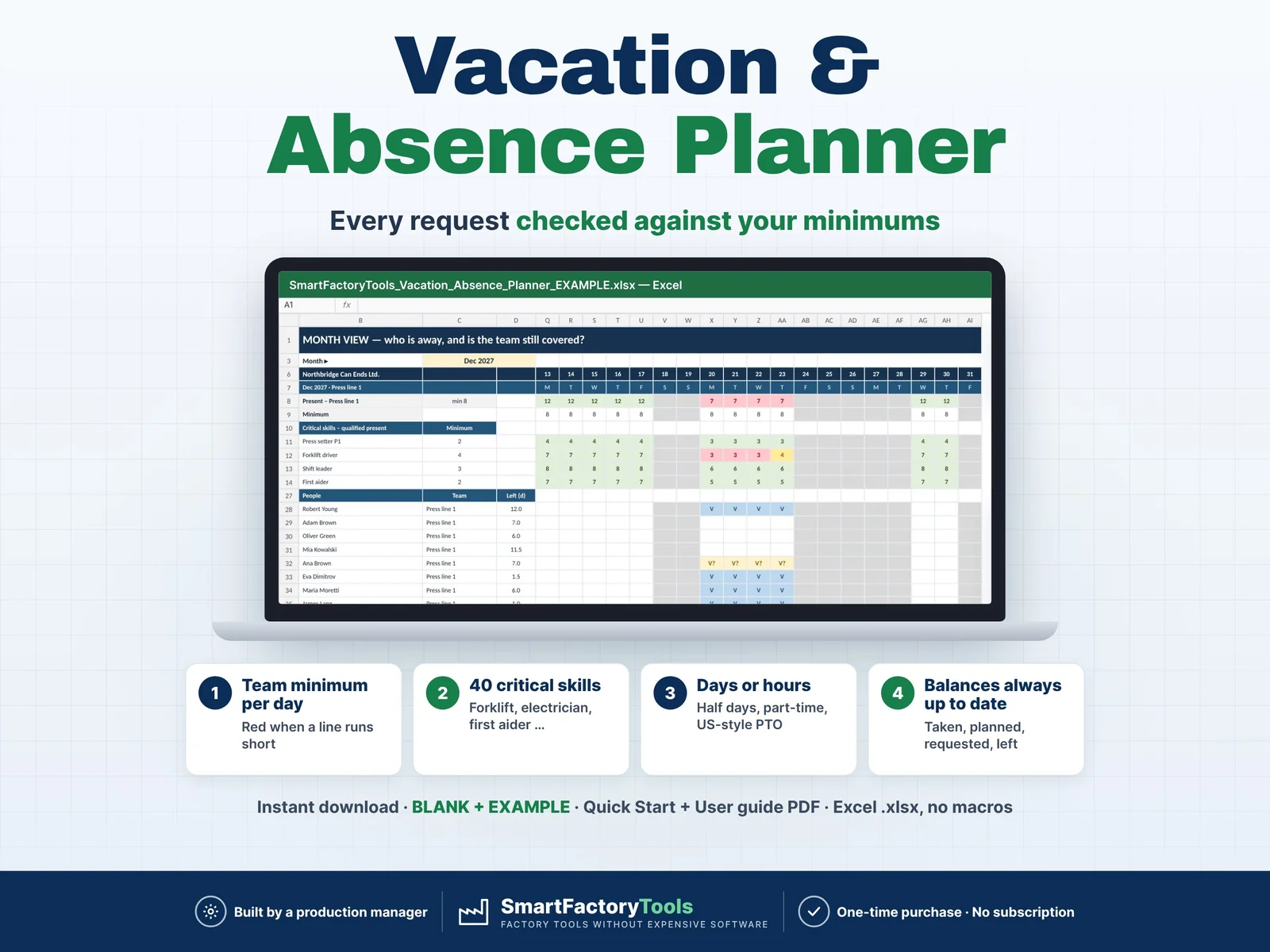
Can I approve this vacation? An Excel vacation and absence planner for production teams that checks every request against your team minimums and critical skills – before you say yes.

€14.99

SKU: SFT-ABS-01 · Digital download (Microsoft Excel)

View on Etsy

Purchase and download through Etsy. Opens in a new tab.

Key features

  • Check on every request: "Request: OK – can be approved" or "⚠ Team Press line 1 below minimum from 20-Dec (lowest 7 of 8)" or "⚠ Forklift driver below minimum from 20-Dec" or "⚠ Over entitlement by 2.0 days"
  • Minimum people present per team (up to 20 teams) and minimum qualified people per critical skill (up to 40 – forklift, electrician, press setter, first aider …), per team or plant-wide
  • Days or hours: half days, US-style PTO in hours, own hours per day for part-time staff
  • Working days only: your working weekdays (Mon–Fri, Mon–Sat …) and your own plant holidays and shutdown days – no country calendar inside, works everywhere
  • Leave balances: entitlement (pro-rata for joiners and leavers), carry-over, taken, planned, requested, left – with warnings for over entitlement and too much leave left at year end
  • Open requests can count in the staffing check (two requests for the same days warn each other) – your choice
  • Data checks: unknown person or type, wrong dates, outside the leave year or employment, overlapping absences
  • Import skill marks from the SmartFactoryTools Skills Matrix: paste its levels (3 = qualified) or simply type Y
  • MONTH_VIEW – month and team: absence codes per person, people present per day against the minimum, critical skill cover. Print it for the notice board.
  • YEAR_VIEW – one column per week, the tightest day for every team and skill: spot risky summer and Christmas weeks months ahead.
  • BALANCES – leave per person in days or hours.
  • DASHBOARD – leave taken and planned, open requests with warnings, days below minimum, unplanned absence (sick) by month and type, top balances.

Main benefits

  • Every request checked against the minimum crew per day
  • Up to 40 critical skills – forklift, electrician, first aider …
  • Days or hours: half days, part-time and US-style PTO
  • Instant download: BLANK + EXAMPLE · Quick Start + User guide PDF
  • Built by a production manager · one-time purchase, no subscription, no macros

Who this tool is for

  • Production, plant and operations managers
  • Team and shift leaders who approve leave
  • HR and plant administrators in manufacturing, food, packaging, assembly and warehouses with 20–150 people
  • Staffing is checked per DAY, not per hour or shift. A part-day absence (half day, 4 hours) counts as absent for the whole day by default – or as present if you set it so in SETUP.
  • Rotating shift crews and shift patterns are not planned here – see our Shift Rota & Crew Rotation Planner.
  • One leave year per file (start a copy for the next year and type the carry-over). No automatic monthly accrual, no country holiday calendars, no payroll, no approval e-mails.
  • Limits: 150 people · 20 teams · 40 critical skills · 1,000 absence rows · 10 absence types · 30 holidays.

How it works

  • 1. SETUP: first day of the leave year (any month), Days or Hours, working weekdays, your holidays, absence types (deducts from leave? planned or unplanned?).
  • 2. TEAMS_SKILLS: minimum people per team, minimum qualified people per critical skill.
  • 3. EMPLOYEES: team, entitlement, carry-over, Y for each critical skill.
  • 4. ABSENCES: one row per request, vacation, sick day or training – read the Check, approve or reject.

What's included

  • SmartFactoryTools_Vacation_Absence_Planner_v1.0_BLANK.xlsx – empty, no warnings until you enter data
  • SmartFactoryTools_Vacation_Absence_Planner_v1.0_EXAMPLE.xlsx – fictional metal packaging plant: 72 people, 8 teams, 11 critical skills, leave year 2027, 5 open requests (some problems built in on purpose to show the checks)
  • Quick_Start_Guide.pdf – 2 pages
  • User_Guide.pdf – 5 pages: every sheet, setting, check and message explained
  • Sheets: START_HERE, SETUP, TEAMS_SKILLS, EMPLOYEES, ABSENCES, MONTH_VIEW, YEAR_VIEW, BALANCES, DASHBOARD, FAQ, LICENSE

Software requirements

  • Requires Microsoft Excel 2016 or newer on a computer (Windows or Mac). Not for Google Sheets, Apple Numbers or mobile apps. No macros.

Important limitations

  • Staffing is checked per DAY, not per hour or shift. A part-day absence (half day, 4 hours) counts as absent for the whole day by default – or as present if you set it so in SETUP.
  • Rotating shift crews and shift patterns are not planned here – see our Shift Rota & Crew Rotation Planner.
  • One leave year per file (start a copy for the next year and type the carry-over). No automatic monthly accrual, no country holiday calendars, no payroll, no approval e-mails.
  • Limits: 150 people · 20 teams · 40 critical skills · 1,000 absence rows · 10 absence types · 30 holidays.
Full product description

Can I approve this vacation? An Excel vacation and absence planner for production teams that checks every request against your team minimums and critical skills – before you say yes.

  • Every request checked against the minimum crew per day
  • Up to 40 critical skills – forklift, electrician, first aider …
  • Days or hours: half days, part-time and US-style PTO
  • Instant download: BLANK + EXAMPLE · Quick Start + User guide PDF
  • Built by a production manager · one-time purchase, no subscription, no macros

▶ Requires Microsoft Excel 2016 or newer on a computer (Windows or Mac). Not for Google Sheets, Apple Numbers or mobile apps. No macros.

A request comes in, you say yes – and three weeks later the line runs with too few people, or both forklift drivers are on holiday on the same days. Generic vacation trackers only count days. This planner counts the people who are still at work: per team and per critical skill, every working day of the year.

WHAT IT DOES

  • Check on every request: "Request: OK – can be approved" or "⚠ Team Press line 1 below minimum from 20-Dec (lowest 7 of 8)" or "⚠ Forklift driver below minimum from 20-Dec" or "⚠ Over entitlement by 2.0 days"
  • Minimum people present per team (up to 20 teams) and minimum qualified people per critical skill (up to 40 – forklift, electrician, press setter, first aider …), per team or plant-wide
  • Days or hours: half days, US-style PTO in hours, own hours per day for part-time staff
  • Working days only: your working weekdays (Mon–Fri, Mon–Sat …) and your own plant holidays and shutdown days – no country calendar inside, works everywhere
  • Leave balances: entitlement (pro-rata for joiners and leavers), carry-over, taken, planned, requested, left – with warnings for over entitlement and too much leave left at year end
  • Open requests can count in the staffing check (two requests for the same days warn each other) – your choice
  • Data checks: unknown person or type, wrong dates, outside the leave year or employment, overlapping absences
  • Import skill marks from the SmartFactoryTools Skills Matrix: paste its levels (3 = qualified) or simply type Y

VIEWS

  • MONTH_VIEW – month and team: absence codes per person, people present per day against the minimum, critical skill cover. Print it for the notice board.
  • YEAR_VIEW – one column per week, the tightest day for every team and skill: spot risky summer and Christmas weeks months ahead.
  • BALANCES – leave per person in days or hours.
  • DASHBOARD – leave taken and planned, open requests with warnings, days below minimum, unplanned absence (sick) by month and type, top balances.

WHAT'S INCLUDED (ZIP)

  • SmartFactoryTools_Vacation_Absence_Planner_v1.0_BLANK.xlsx – empty, no warnings until you enter data
  • SmartFactoryTools_Vacation_Absence_Planner_v1.0_EXAMPLE.xlsx – fictional metal packaging plant: 72 people, 8 teams, 11 critical skills, leave year 2027, 5 open requests (some problems built in on purpose to show the checks)
  • Quick_Start_Guide.pdf – 2 pages
  • User_Guide.pdf – 5 pages: every sheet, setting, check and message explained

Sheets: START_HERE, SETUP, TEAMS_SKILLS, EMPLOYEES, ABSENCES, MONTH_VIEW, YEAR_VIEW, BALANCES, DASHBOARD, FAQ, LICENSE

HOW IT WORKS

  1. SETUP: first day of the leave year (any month), Days or Hours, working weekdays, your holidays, absence types (deducts from leave? planned or unplanned?).
  2. TEAMS_SKILLS: minimum people per team, minimum qualified people per critical skill.
  3. EMPLOYEES: team, entitlement, carry-over, Y for each critical skill.
  4. ABSENCES: one row per request, vacation, sick day or training – read the Check, approve or reject.

WHO IT'S FOR

  • Production, plant and operations managers
  • Team and shift leaders who approve leave
  • HR and plant administrators in manufacturing, food, packaging, assembly and warehouses with 20–150 people

IMPORTANT – PLEASE READ

  • Staffing is checked per DAY, not per hour or shift. A part-day absence (half day, 4 hours) counts as absent for the whole day by default – or as present if you set it so in SETUP.
  • Rotating shift crews and shift patterns are not planned here – see our Shift Rota & Crew Rotation Planner.
  • One leave year per file (start a copy for the next year and type the carry-over). No automatic monthly accrual, no country holiday calendars, no payroll, no approval e-mails.
  • Limits: 150 people · 20 teams · 40 critical skills · 1,000 absence rows · 10 absence types · 30 holidays.

FAQ

Q: Does it work in Google Sheets or on an iPad?

A: No. It is built and tested for Microsoft Excel 2016 or newer on Windows or Mac desktop.

Q: We count PTO in hours. Does it work?

A: Yes. Set SETUP › Leave unit = Hours. Entitlement and balances are in hours; a full day = working days × hours per day (own hours for part-timers).

Q: Does it include public holidays for my country?

A: No – you type your own plant holidays and shutdown days, so it works in any country.

Q: Does it approve requests automatically?

A: No. It shows the risk; the manager decides.

Q: Can I change the formulas?

A: Sheets are protected without a password to prevent accidental damage. Review › Unprotect Sheet unlocks them.

Related SmartFactoryTools templates: Skills Matrix & Coverage Risk Planner, Shift Rota & Crew Rotation Planner, Daily Operator Assignment Board, Training Matrix.

DIGITAL DOWNLOAD

This is a digital product – nothing is shipped. After purchase, download the ZIP on a computer, unzip it and open the files in Excel. Because of the digital nature of the product, returns are not accepted; if anything is unclear, message us and we will help.

LICENSE

For use within the buyer's own company or organisation. Resale, sharing, redistribution or uploading to other websites is not permitted. © SmartFactoryTools

Related tools

Skills Matrix & Coverage Risk Planner – main listing imageWorkforce & Shifts

Skills Matrix & Coverage Risk Planner

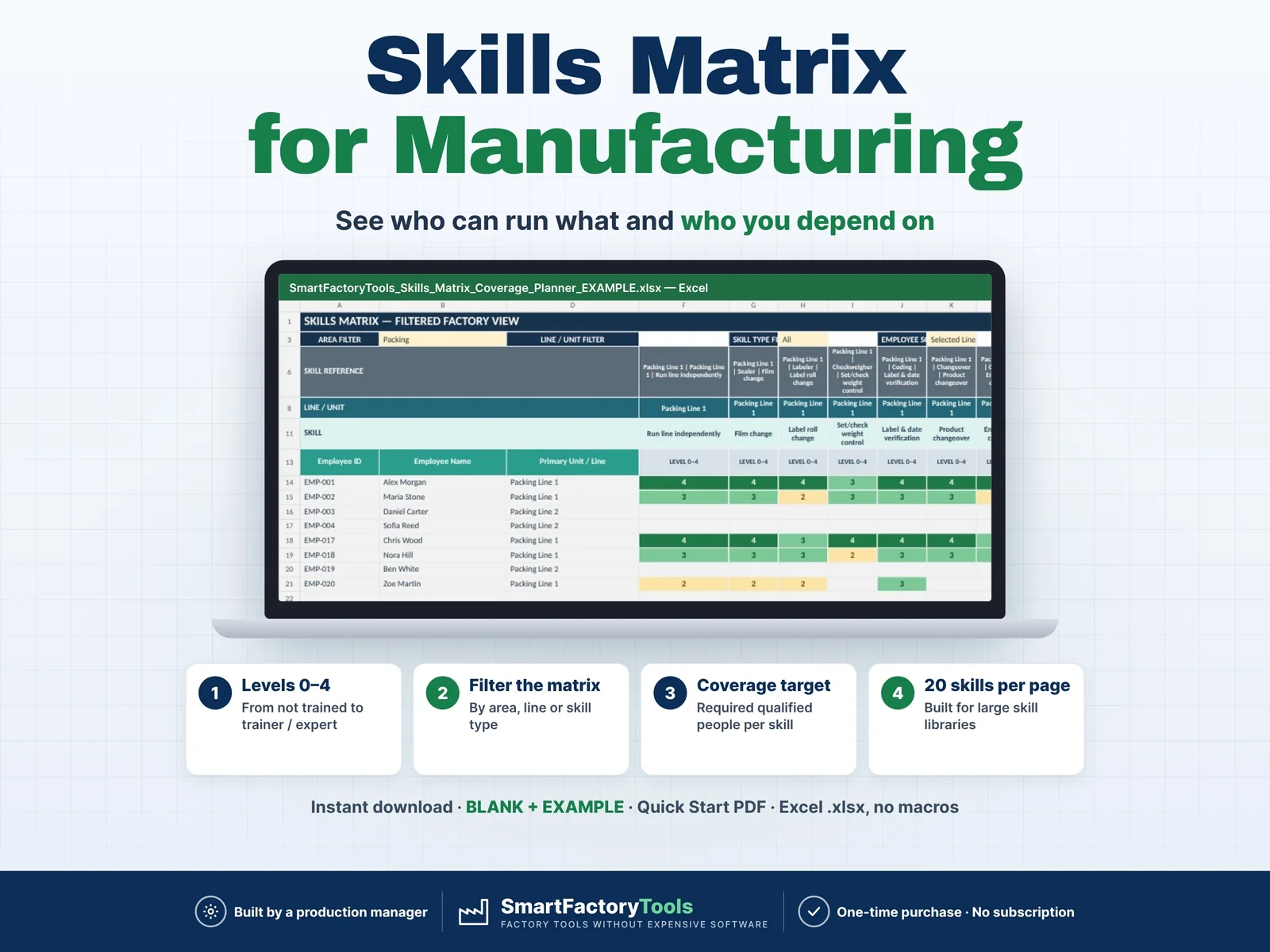
Build a clear employee skills matrix, identify single-person dependencies, and see exactly where cross-training is needed before qualification gaps become production risks.

€19.99

View details
Manpower Requirement Calculator – main listing imageWorkforce & Shifts

Manpower Requirement Calculator

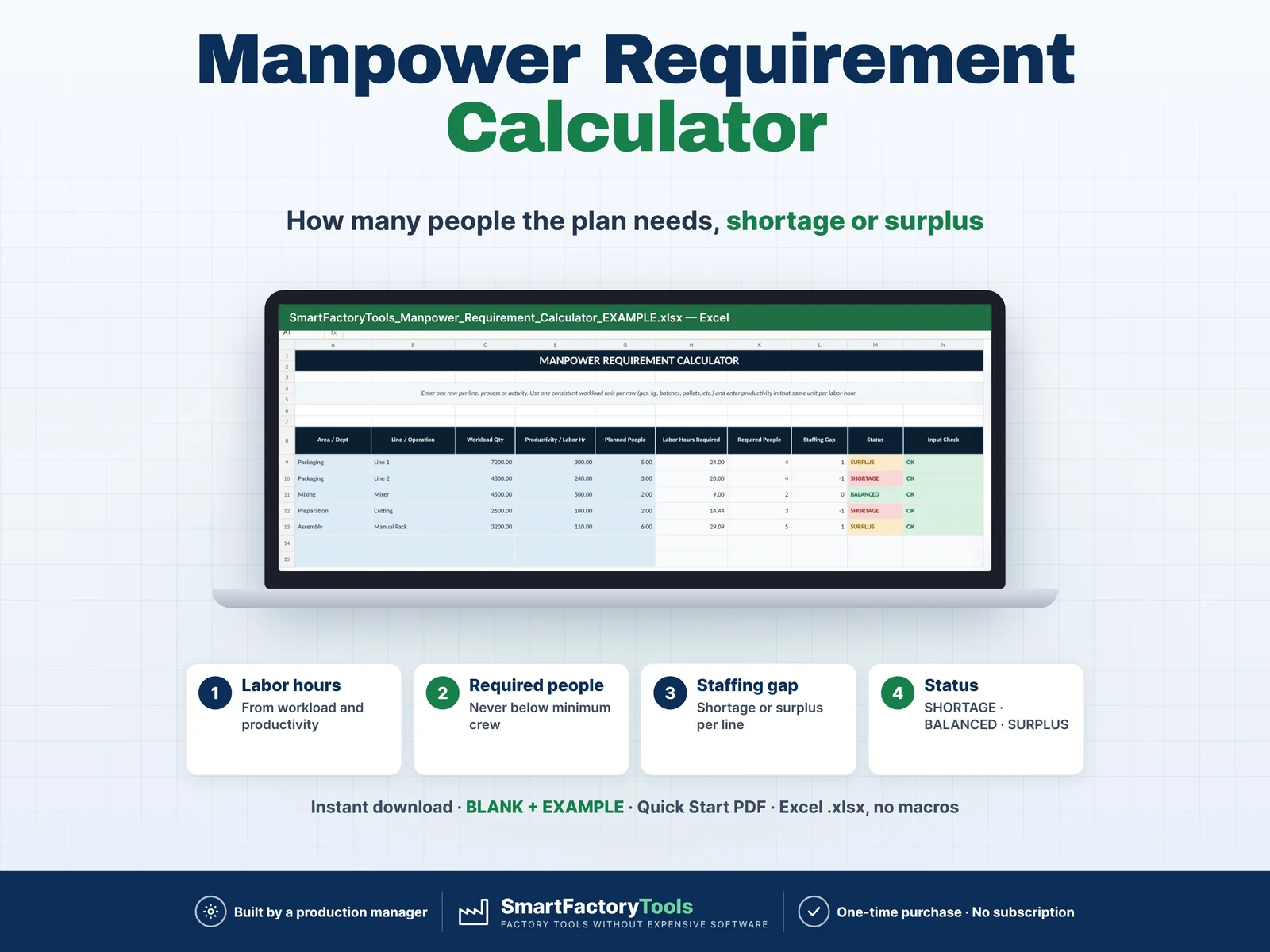
Calculate how many people your production plan actually requires and quickly identify staffing shortages, balanced areas and surplus manpower. Enter your workload, labor productivity, minimum crew requirements and currently planned people. The workbook automatically calculates required labor hours, required headcount and staffing gaps for each production line, department or operation. Designed for production planners, supervisors, manufacturing managers and operations teams that need a fast and practical workforce planning tool.

€7.99

View details
Training Matrix & Certification Expiry Tracker – main listing imageWorkforce & Shifts

Training Matrix & Certification Expiry Tracker

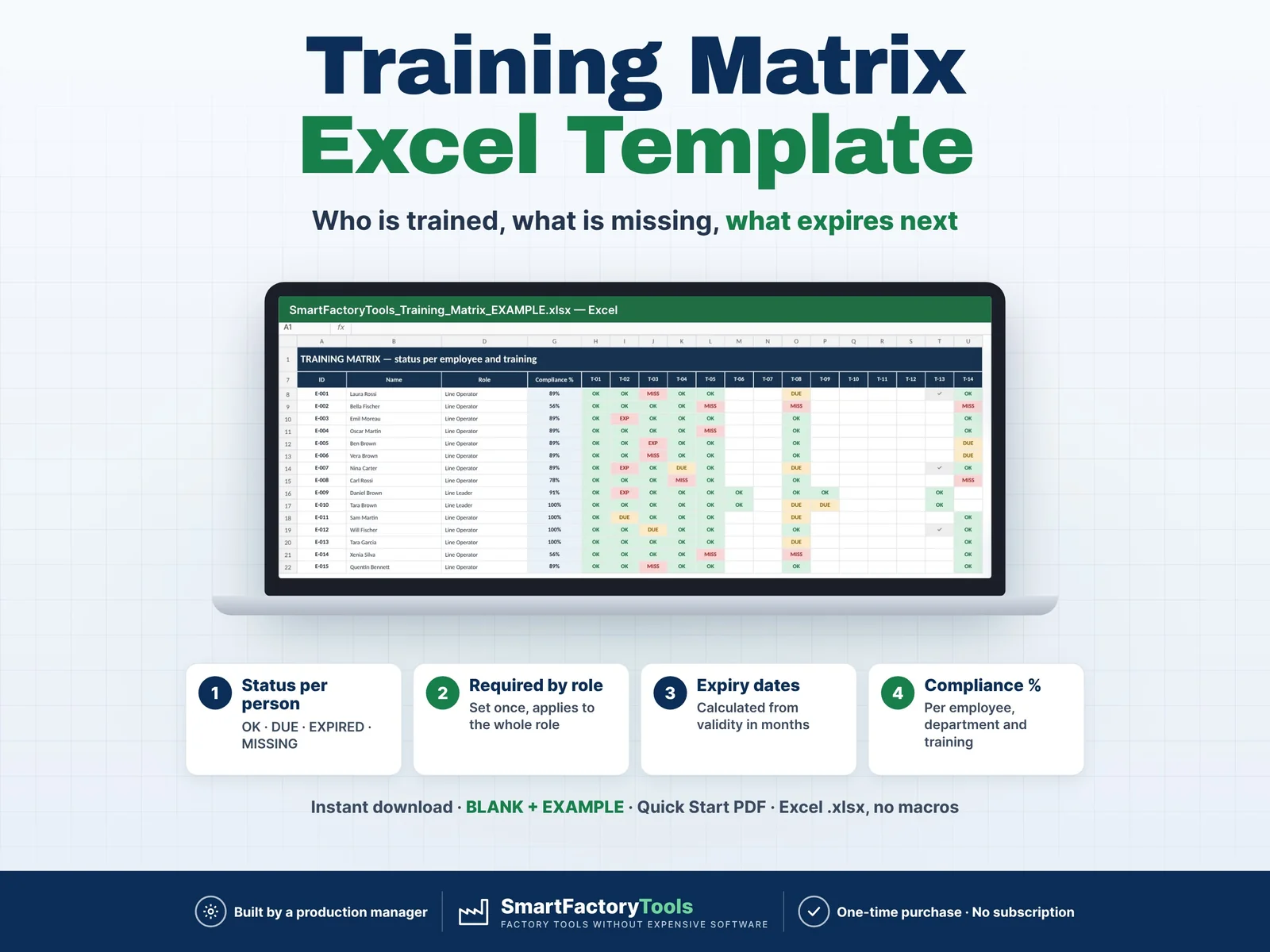
Know who is trained, what is missing and what expires next — for every employee, by role.

€19.99

View details